> For the complete documentation index, see [llms.txt](https://learnphp.gitbook.io/learnphp/llms.txt). Markdown versions of documentation pages are available by appending `.md` to page URLs; this page is available as [Markdown](https://learnphp.gitbook.io/learnphp/learn-lavarel/pagination-withquerystring-withpath-de-thay-doi-url-theo-y-ban-appends-add-query-string-full-ok.md).

# Pagination withQueryString,  withPath để thay đổi URL theo ý bạn, appends add query string full (ok)

<figure><img src="/files/JyfHL5Rdd7QmJZrgaImo" alt=""><figcaption></figcaption></figure>

### E 1.

C:\xampp8\htdocs\datvietcoconut\routes\web.php

```php
<?php
use Illuminate\Support\Facades\Route;
use App\Models\User;
/*
|--------------------------------------------------------------------------
| Web Routes
|--------------------------------------------------------------------------
|
| Here is where you can register web routes for your application. These
| routes are loaded by the RouteServiceProvider within a group which
| contains the "web" middleware group. Now create something great!
|
*/
Route::get('/', function () {
  $users = User::paginate(5);
  return view('users.index')->with(compact('users'));
});

```

C:\xampp8\htdocs\datvietcoconut\app\Providers\AppServiceProvider.php

```php
<?php
namespace App\Providers;
use Illuminate\Support\ServiceProvider;
use Illuminate\Pagination\Paginator;
class AppServiceProvider extends ServiceProvider
{
  /**
   * Register any application services.
   *
   * @return void
   */
  public function register()
  {
    //
  }
  /**
   * Bootstrap any application services.
   *
   * @return void
   */
  public function boot()
  {
    Paginator::useBootstrap();
  }
}

```

C:\xampp8\htdocs\datvietcoconut\resources\views\users\index.blade.php

```blade
<!DOCTYPE html>
<html lang="en">
<head>
  <meta charset="UTF-8">
  <meta name="viewport" content="width=device-width, initial-scale=1.0">
  <meta http-equiv="X-UA-Compatible" content="ie=edge">
  <meta name="csrf-token" content="{{ csrf_token() }}">
  @vite(['resources/sass/app.scss'])
  <title>Document</title>
</head>
<body>
  <div class="container">
    @foreach ($users as $key => $user)
   {{ $key + 1 }} - {{ $user->name }}  <br/>
    @endforeach
  </div>
  <div class="container">
    {{ $users->links() }}
  </div>
</body>
</html>

```

### E 2.

C:\xampp8\htdocs\datvietcoconut\routes\web.php

<figure><img src="/files/CUxjLIgx6FPETO582qvu" alt=""><figcaption></figcaption></figure>

```php
<?php
use Illuminate\Support\Facades\Route;
use App\Models\User;
/*
|--------------------------------------------------------------------------
| Web Routes
|--------------------------------------------------------------------------
|
| Here is where you can register web routes for your application. These
| routes are loaded by the RouteServiceProvider within a group which
| contains the "web" middleware group. Now create something great!
|
*/
Route::get('/', function () {
  $users = User::paginate(5);
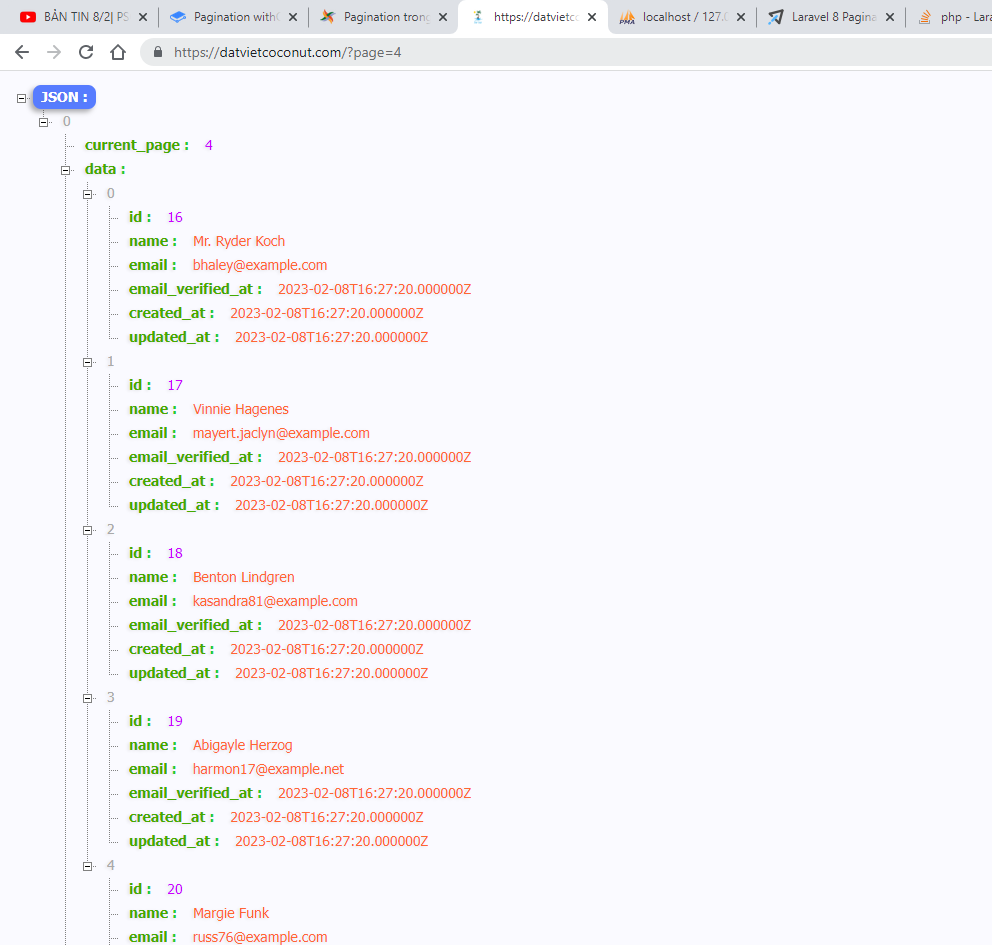
  return response()->json([$users], 200);
});

```

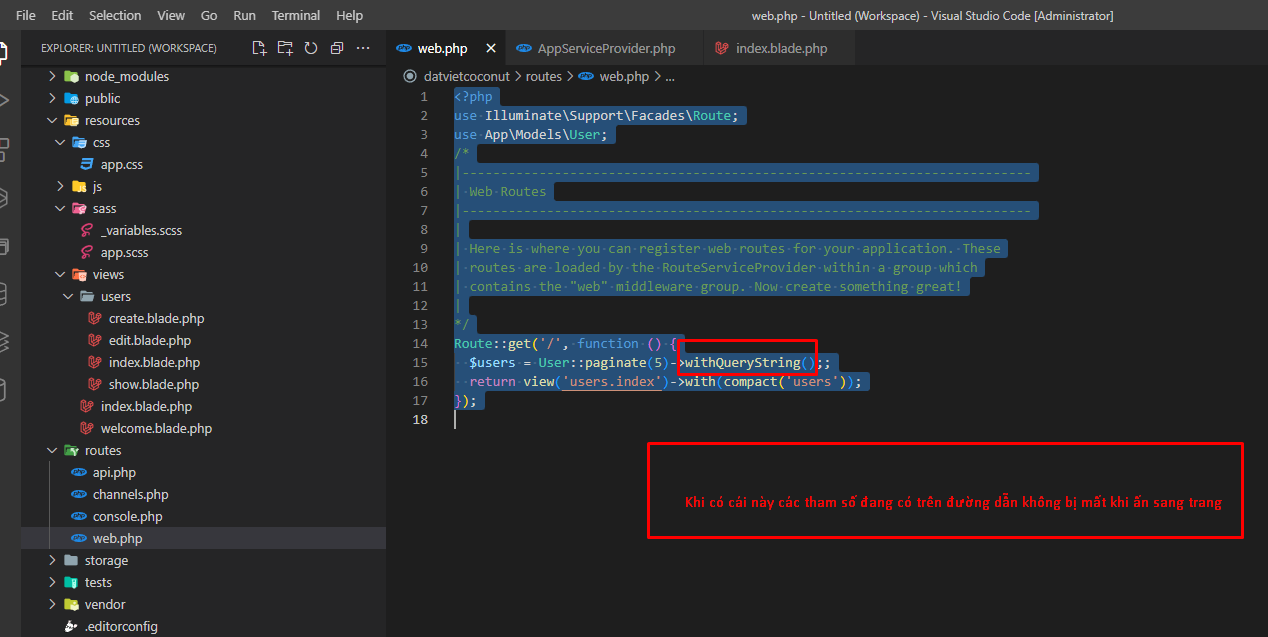
### E 3.&#x20;

<figure><img src="/files/dDYQh8LfbIyjOvxmJR0Z" alt=""><figcaption></figcaption></figure>

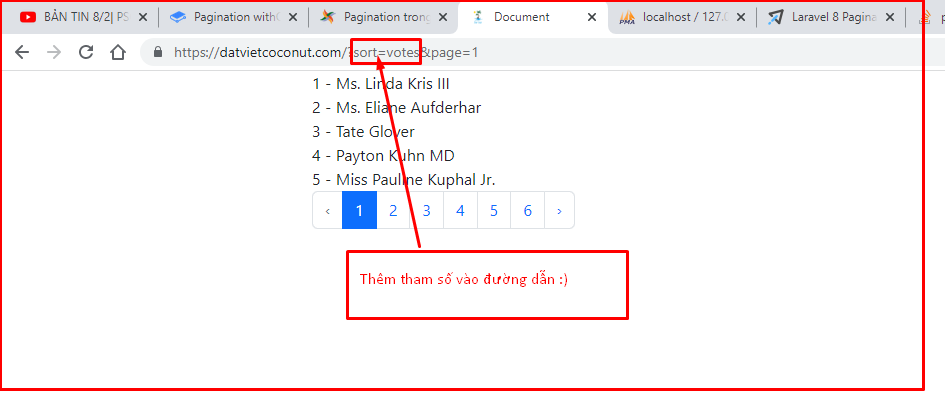
<figure><img src="/files/wtHOyWOvFcgVu0NIgWpO" alt=""><figcaption><p><em><strong>Khi có cái này các tham số đang có trên đường dẫn không bị mất khi ấn sang trang</strong></em></p></figcaption></figure>

C:\xampp8\htdocs\datvietcoconut\routes\web.php

```php
<?php
use Illuminate\Support\Facades\Route;
use App\Models\User;
/*
|--------------------------------------------------------------------------
| Web Routes
|--------------------------------------------------------------------------
|
| Here is where you can register web routes for your application. These
| routes are loaded by the RouteServiceProvider within a group which
| contains the "web" middleware group. Now create something great!
|
*/
Route::get('/', function () {
  $users = User::paginate(5)->withQueryString();;
  return view('users.index')->with(compact('users'));
});

```

### E 4. Appends

<figure><img src="/files/gJekXzQy5Pek8RwzvDRg" alt=""><figcaption></figcaption></figure>

C:\xampp8\htdocs\datvietcoconut\routes\web.php

```php
<?php
use Illuminate\Support\Facades\Route;
use App\Models\User;
/*
|--------------------------------------------------------------------------
| Web Routes
|--------------------------------------------------------------------------
|
| Here is where you can register web routes for your application. These
| routes are loaded by the RouteServiceProvider within a group which
| contains the "web" middleware group. Now create something great!
|
*/
Route::get('/', function () {
  $users = User::paginate(5);
  $users->appends(['sort' => 'votes']);
  return view('users.index')->with(compact('users'));
});

```

### E 5. thêm cách hash fragment

<figure><img src="/files/A9XcIIyDfPH0dxzPYs1t" alt=""><figcaption></figcaption></figure>

C:\xampp8\htdocs\datvietcoconut\routes\web.php

```php
<?php
use Illuminate\Support\Facades\Route;
use App\Models\User;
/*
|--------------------------------------------------------------------------
| Web Routes
|--------------------------------------------------------------------------
|
| Here is where you can register web routes for your application. These
| routes are loaded by the RouteServiceProvider within a group which
| contains the "web" middleware group. Now create something great!
|
*/
Route::get('/', function () {
  $users = User::paginate(5)->fragment('users');
  return view('users.index')->with(compact('users'));
});

```

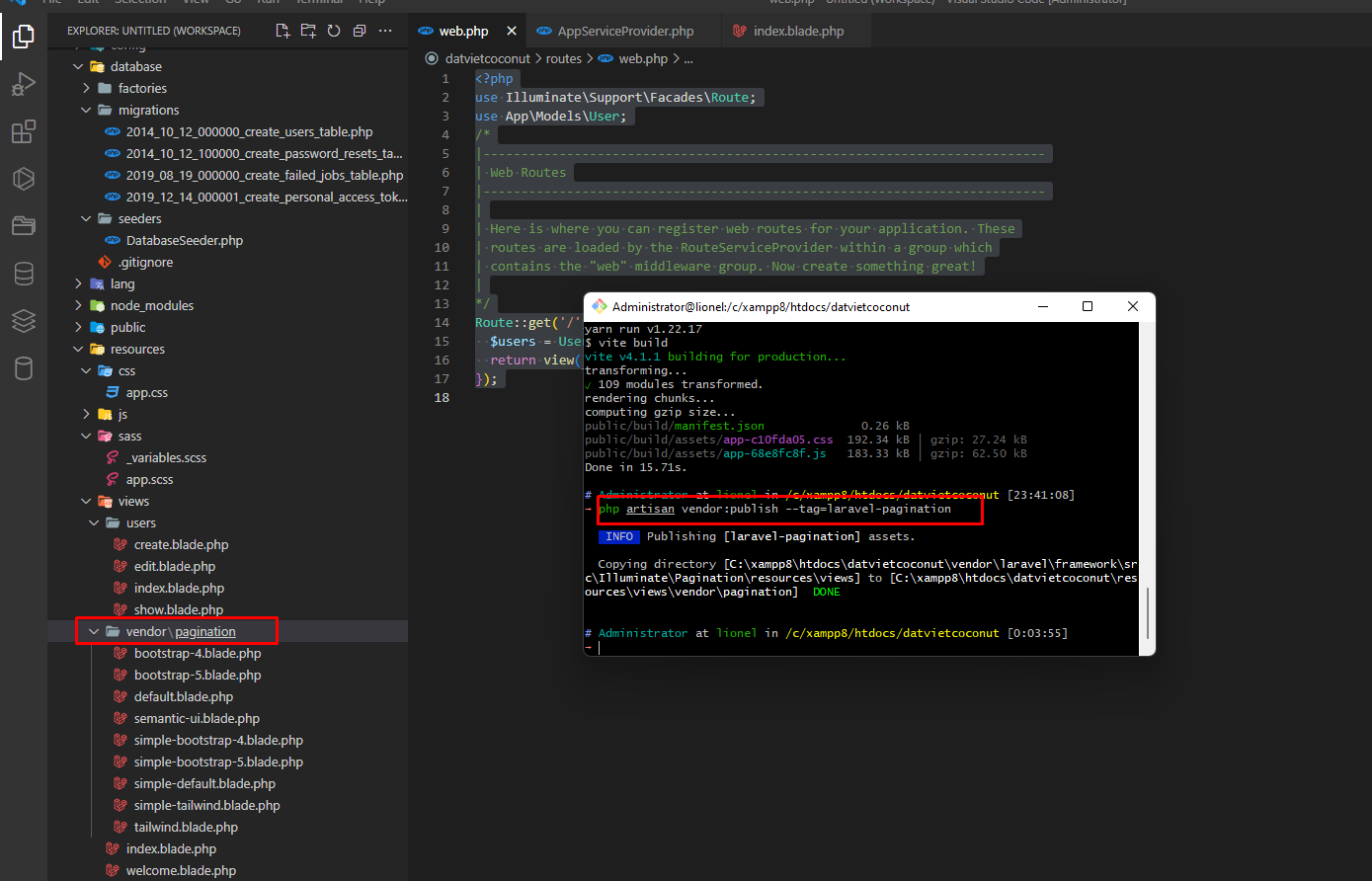
### 😁 Bạn có thể export các view mặc định của Laravel ra thư mục `resources/views/vendor` để tiện cho việc tham khảo cũng như là chỉnh sửa. Để export view bạn có thể sử dụng command `vendor:publish` với tham số `--tag=laravel-pagination`.

<figure><img src="/files/uUgr3vrarPQBLmMvtujp" alt=""><figcaption></figcaption></figure>

```
php artisan vendor:publish --tag=laravel-pagination
```

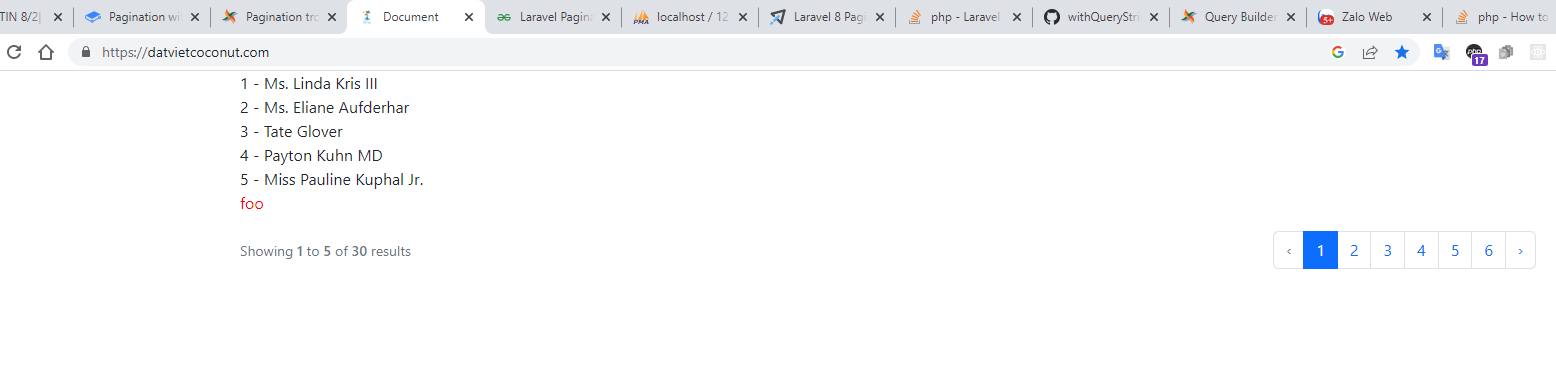
Hoặc muốn truyền thêm data vào view {{ $paginator->links('view\.name', \['foo' => 'bar']) }}

<figure><img src="/files/qIpH5U3jP2HgiPCrwr76" alt=""><figcaption></figcaption></figure>

C:\xampp8\htdocs\datvietcoconut\routes\web.php

```php
<?php
use Illuminate\Support\Facades\Route;
use App\Models\User;
/*
|--------------------------------------------------------------------------
| Web Routes
|--------------------------------------------------------------------------
|
| Here is where you can register web routes for your application. These
| routes are loaded by the RouteServiceProvider within a group which
| contains the "web" middleware group. Now create something great!
|
*/
Route::get('/', function () {
  $users = User::paginate(5);
  return view('users.index')->with(compact('users'));
});

```

C:\xampp8\htdocs\datvietcoconut\resources\views\users\index.blade.php

```blade
<!DOCTYPE html>
<html lang="en">
<head>
  <meta charset="UTF-8">
  <meta name="viewport" content="width=device-width, initial-scale=1.0">
  <meta http-equiv="X-UA-Compatible" content="ie=edge">
  <meta name="csrf-token" content="{{ csrf_token() }}">
  @vite(['resources/sass/app.scss'])
  <title>Document</title>
</head>
<body>
  <div class="container">
    @foreach ($users as $key => $user)
    {{ $key + 1 }} - {{ $user->name }} <br />
    @endforeach
  </div>
  <div class="container">
    {{ $users->links('vendor\pagination\bootstrap-5',['foo' => 'bar']) }}
  </div>
</body>
</html>

```

C:\xampp8\htdocs\datvietcoconut\resources\views\vendor\pagination\bootstrap-5.blade.php

```blade
<p style="color: red">foo</p>
@if ($paginator->hasPages())
<nav class="d-flex justify-items-center justify-content-between">
  <div class="d-flex justify-content-between flex-fill d-sm-none">
    <ul class="pagination">
      {{-- Previous Page Link --}}
      @if ($paginator->onFirstPage())
      <li class="page-item disabled" aria-disabled="true">
        <span class="page-link">@lang('pagination.previous')</span>
      </li>
      @else
      <li class="page-item">
        <a class="page-link" href="{{ $paginator->previousPageUrl() }}" rel="prev">@lang('pagination.previous')</a>
      </li>
      @endif
      {{-- Next Page Link --}}
      @if ($paginator->hasMorePages())
      <li class="page-item">
        <a class="page-link" href="{{ $paginator->nextPageUrl() }}" rel="next">@lang('pagination.next')</a>
      </li>
      @else
      <li class="page-item disabled" aria-disabled="true">
        <span class="page-link">@lang('pagination.next')</span>
      </li>
      @endif
    </ul>
  </div>
  <div class="d-none flex-sm-fill d-sm-flex align-items-sm-center justify-content-sm-between">
    <div>
      <p class="small text-muted">
        {!! __('Showing') !!}
        <span class="fw-semibold">{{ $paginator->firstItem() }}</span>
        {!! __('to') !!}
        <span class="fw-semibold">{{ $paginator->lastItem() }}</span>
        {!! __('of') !!}
        <span class="fw-semibold">{{ $paginator->total() }}</span>
        {!! __('results') !!}
      </p>
    </div>
    <div>
      <ul class="pagination">
        {{-- Previous Page Link --}}
        @if ($paginator->onFirstPage())
        <li class="page-item disabled" aria-disabled="true" aria-label="@lang('pagination.previous')">
          <span class="page-link" aria-hidden="true">&lsaquo;</span>
        </li>
        @else
        <li class="page-item">
          <a class="page-link" href="{{ $paginator->previousPageUrl() }}" rel="prev" aria-label="@lang('pagination.previous')">&lsaquo;</a>
        </li>
        @endif
        {{-- Pagination Elements --}}
        @foreach ($elements as $element)
        {{-- "Three Dots" Separator --}}
        @if (is_string($element))
        <li class="page-item disabled" aria-disabled="true"><span class="page-link">{{ $element }}</span></li>
        @endif
        {{-- Array Of Links --}}
        @if (is_array($element))
        @foreach ($element as $page => $url)
        @if ($page == $paginator->currentPage())
        <li class="page-item active" aria-current="page"><span class="page-link">{{ $page }}</span></li>
        @else
        <li class="page-item"><a class="page-link" href="{{ $url }}">{{ $page }}</a></li>
        @endif
        @endforeach
        @endif
        @endforeach
        {{-- Next Page Link --}}
        @if ($paginator->hasMorePages())
        <li class="page-item">
          <a class="page-link" href="{{ $paginator->nextPageUrl() }}" rel="next" aria-label="@lang('pagination.next')">&rsaquo;</a>
        </li>
        @else
        <li class="page-item disabled" aria-disabled="true" aria-label="@lang('pagination.next')">
          <span class="page-link" aria-hidden="true">&rsaquo;</span>
        </li>
        @endif
      </ul>
    </div>
  </div>
</nav>
@endif

```

### 1. Sử dụng Pagination với Query Builder <a href="#load-h2-1" id="load-h2-1"></a>

Để phân trang kết quả trả về trong query builder các bạn sử dụng phương thức paginate với cú pháp sau:

```php
phpcopypaginate($perPage, $columns, $pageName, $page);
```

**Trong đó**:

* `$perPage` - là số lượng item sẽ lấy ra và hiển thị trên mỗi trang. Mặc định sẽ là 15 item trên mỗi trang.
* `$columns` - là những cột sẽ lấy ra trong database. Mặc định sẽ lấy hết (`SELETC *`)
* `$pageName` - là tên của query string sẽ chứa tham số page number. Mặc định `$pageName = 'page'`.
* `$page` - là item bạn muốn lấy ra là trang số mấy, nếu page là null thì Laravel sẽ xử lý theo data của page query string. Mặc định `$page = null`.

VD: phân trang 5 User trong bảng users một trang.

```php
phpcopy<?php

namespace App\Http\Controllers;

use App\Http\Controllers\Controller;
use Illuminate\Support\Facades\DB;

class UserController extends Controller
{
    /**
     * Show all of the users for the application.
     *
     * @return \Illuminate\Http\Response
     */
    public function index()
    {
        return view('user.index', [
            'users' => DB::table('users')->paginate(5)
        ]);
    }
}
```

Trong trường hợp bạn muốn sử dụng pagination dạng đơn giản, chỉ có 2 button là previous và next thì bạn có thể sử dụng phương thức `simplePaginate` với cú pháp tương tự như phương thức paginate.

**VD**:

```php
phpcopy$users = DB::table('users')->simplePaginate(15);
```

### 2. Sử dụng Pagination với Eloquent ORM <a href="#load-h2-1" id="load-h2-1"></a>

Đối với trường hợp bạn sử dụng Eloquent thì cú pháp và phương thức cũng tương tự như đối với Query Builder.

**VD**:

```php
phpcopyuse App\Models\User;

$users = User::paginate(15);

// hoặc

$users = User::where('votes', '>', 100)->paginate(15);
```

#### Tự tạo ra phân trang thủ công. <a href="#load-h3-2" id="load-h3-2"></a>

Trong trường hợp data của bạn là một dữ liệu không phải được trả về từ Query Builder hoặc Elequent ORM, bạn có thể sử dụng một trong hai class  `Illuminate\Pagination\Paginator` hoặc `Illuminate\Pagination\LengthAwarePaginator` để tạo ra pagination với cú pháp:

```php
use Illuminate\Pagination\Paginator;

$paginate = new Paginator($items, $perPage, $currentPage, $options);

// hooặc

use Illuminate\Pagination\LengthAwarePaginator;

$paginate = new LengthAwarePaginator($items, $total, $perPage, $currentPage, $options);
```

**Trong đó**:

* `$item` - là mảng data mà bạn muốn phân trang.
* `$total` là tổng số bản ghi có trong item.
* `$perPage` - là số lượng item sẽ lấy ra và hiển thị trên mỗi trang.
* `$currentPage` - là trang dữ liệu bạn muốn lấy ra hiện tại. Mặc định `$currentPage = null`.
* `$options` - là các tham số cấu hình thêm cho pagination. Mặc định `$options = []`.

Như các bạn đã thấy thì Ở `Paginator` không tồn tại tham số `$total` vì lớp `paginator` này tương tự như `simplePaginate` nên nó không cần phải lấy ra tổng số lượng item trong mảng, còn `LengthAwarePaginator` thì tương tự như `paginate` nên nó cần lấy ra tổng số lượng item để tính toán và hiển thị.

**VD**:

```php
phpcopy$students = [
    ['name' => 'Lo thi vi song'],
    ['name' => 'Tran Nhu Nhong'],
    ['name' => 'Son Tung MTP'],
    ['name' => 'Tung Son Ido'],
];

$paginate = new \Illuminate\Pagination\Paginator($students, 2);
```

**D**: Đổi paginate URL từ `/users` thành `admin/users`.

```php
phpcopyuse App\Models\User;

Route::get('/users', function () {
    $users = User::paginate(15);

    $users->withPath('/admin/users');

    //
});
```

Nếu phần logic pagination của bạn cần add thêm một vài tham số vào trong URL, bạn có thể sử dụng phương thức `appends` để add thêm query string vào URL.

**VD**: thêm tham số `sort` vào trong URL paginate

```php
phpcopyuse App\Models\User;

Route::get('/users', function () {
    $users = User::paginate(15);

    $users->appends(['sort' => 'votes']);

    //
});
```

Hoặc bạn có thể sử dụng phương thức `withQueryString` để add thêm tất cả các query string trên URL hiện tại vào trong paginate.

**VD**:

```php
$users = User::paginate(15)->withQueryString();
```

Bạn cũng có thể thêm cách hash fragment vào cuối URL trong pagination bằng cách sử dụng phương thức `fragment`.

**VD**: Thêm `#users` vào cuối URL.

```php
$users = User::paginate(15)->fragment('users');
```

### &#x20;3. Hiển thị Pagination Data. <a href="#load-h2-2" id="load-h2-2"></a>

Sau khi đã lấy được data cần phân trang rồi thì giờ chúng ta cần hiển thị chúng ra view. Như mình đã nói ở phần trên thì với trường hợp các bạn sử dụng phương thức `paginate` thì Laravel sẽ trả về `LengthAwarePaginator`, `simplePaginate` sẽ trả về `Paginator` và cả hai phương thức này đều trả về result set như nhau. Các bạn có thể lặp dữ liệu như một array bình thường.

**VD**: Hiển thị data paginate trong [Blade](https://toidicode.com/blade-template-trong-laravel-8-phan-1-446.html).

```php
phpcopy<div class="container">
    @foreach ($users as $user)
        {{ $user->name }}
    @endforeach
</div>

{{ $users->links() }}
```

Trong đó, phương thức links chính là phương thức sẽ render ra view data hiển thị danh sách các page.

![Pagination trong laravel 8](https://static.toidicode.com/uploads/clipboards/f3b2f3011202fa33ce8c29e4b4235c93.png)

Nếu như bạn return luôn một pagination thì Laravel sẽ tự convert nó về dạng JSON, điều này sẽ rất tiện cho các bạn đang làm API.

JSON object sẽ có dạng như sau:

```json
jsoncopy{
   "total": 50,
   "per_page": 15,
   "current_page": 1,
   "last_page": 4,
   "first_page_url": "http://laravel.app?page=1",
   "last_page_url": "http://laravel.app?page=4",
   "next_page_url": "http://laravel.app?page=2",
   "prev_page_url": null,
   "path": "http://laravel.app",
   "from": 1,
   "to": 15,
   "data":[
        {
            // Record...
        },
        {
            // Record...
        }
   ]
}
```

Trong trường hợp bạn không muốn sử dụng pagination view mặc định của Laravel, bạn có thể chỉ định view khác, hoặc thậm chí viết thêm view của bạn. Để thay đổi view bạn chỉ cần truyền view name vào trong phương thức `links`.

**VD**:

```php
phpcopy{{ $paginator->links('view.name') }}

// Hoặc muốn truyền thêm data vào view
{{ $paginator->links('view.name', ['foo' => 'bar']) }}
```

Bạn có thể export các view mặc định của Laravel ra thư mục `resources/views/vendor` để tiện cho việc tham khảo cũng như là chỉnh sửa. Để export view bạn có thể sử dụng command `vendor:publish` với tham số `--tag=laravel-pagination`.

```bash
bashcopyphp artisan vendor:publish --tag=laravel-pagination
```