> For the complete documentation index, see [llms.txt](https://learnphp.gitbook.io/learnphp/llms.txt). Markdown versions of documentation pages are available by appending `.md` to page URLs; this page is available as [Markdown](https://learnphp.gitbook.io/learnphp/learn-lavarel/laravel-9-autocomplete-search-using-typeahead-js-example.md).
# Laravel 9 Autocomplete Search using Typeahead JS Example
https\://www\.itsolutionstuff.com/post/laravel-9-autocomplete-search-using-typeahead-js-exampleexample.html
Now, let's see example of laravel 9 autocomplete search using typeahead.js. it's a simple example of creating autocomplete search with typeahead.js in laravel 9. it's a simple example of typeahead js ajax autocomplete textbox in laravel 9. you'll learn laravel 9 bootstrap 5 typeahead autocomplete ajax. So, let's follow few step to create example of how to create an autocomplete input in laravel 9 using typeahead.
In this example, we will download the fresh laravel 9 app and run migration for creating users table. Then we will create some dummy users using tinker. Then we will create a simple blade file with the input field. we will create autocomplete text box using typeahead.js.
So, let's see simple steps to complete this task.

**Step 1: Install Laravel 9**
This is optional; however, if you have not created the laravel app, then you may go ahead and execute the below command:
```
composer create-project laravel/laravel example-app
```
**Step 2: Add Dummy Users**
First, we need to run default migrations, so we have created new users table. so let's run migration command:
```
php artisan migrate
```
next, we will create some dummy users using tinker factory. so let's create dummy records using bellow command:
```
php artisan tinker User::factory()->count(20)->create()
```
Read Also: [Laravel 9 CRUD Application Tutorial Example](https://www.itsolutionstuff.com/post/laravel-9-crud-application-tutorial-exampleexample.html)
**Step 3: Create Controller**
In this point, now we should create new controller as SearchController. This controller we will add two method, one for return view response and another for getting ajax with json response. return response, so put bellow content in controller file:
app/Http/Controllers/SearchController.php
```
where('name', 'LIKE', '%'. $request->get('query'). '%') ->get(); return response()->json($data); }}
```
**Step 4: Create Routes**
In this is step we need to create route for datatables layout file and another one for getting data. so open your "routes/web.php" file and add following route.
routes/web.php
```
group(function(){ Route::get('demo-search', 'index'); Route::get('autocomplete', 'autocomplete')->name('autocomplete');});
```
**Step 5: Create View File**
In Last step, let's create searchDemo.blade.php(resources/views/searchDemo.blade.php) for layout and lists all items code here and put following code:
resources/views/searchDemo.blade.php
```
Laravel 9 Autocomplete Search from Database - ItSolutionStuff.com
Laravel 9 Autocomplete Search from Database - ItSolutionStuff.com
```
**Run Laravel App:**
All the required steps have been done, now you have to type the given below command and hit enter to run the Laravel app:
```
php artisan serve
```
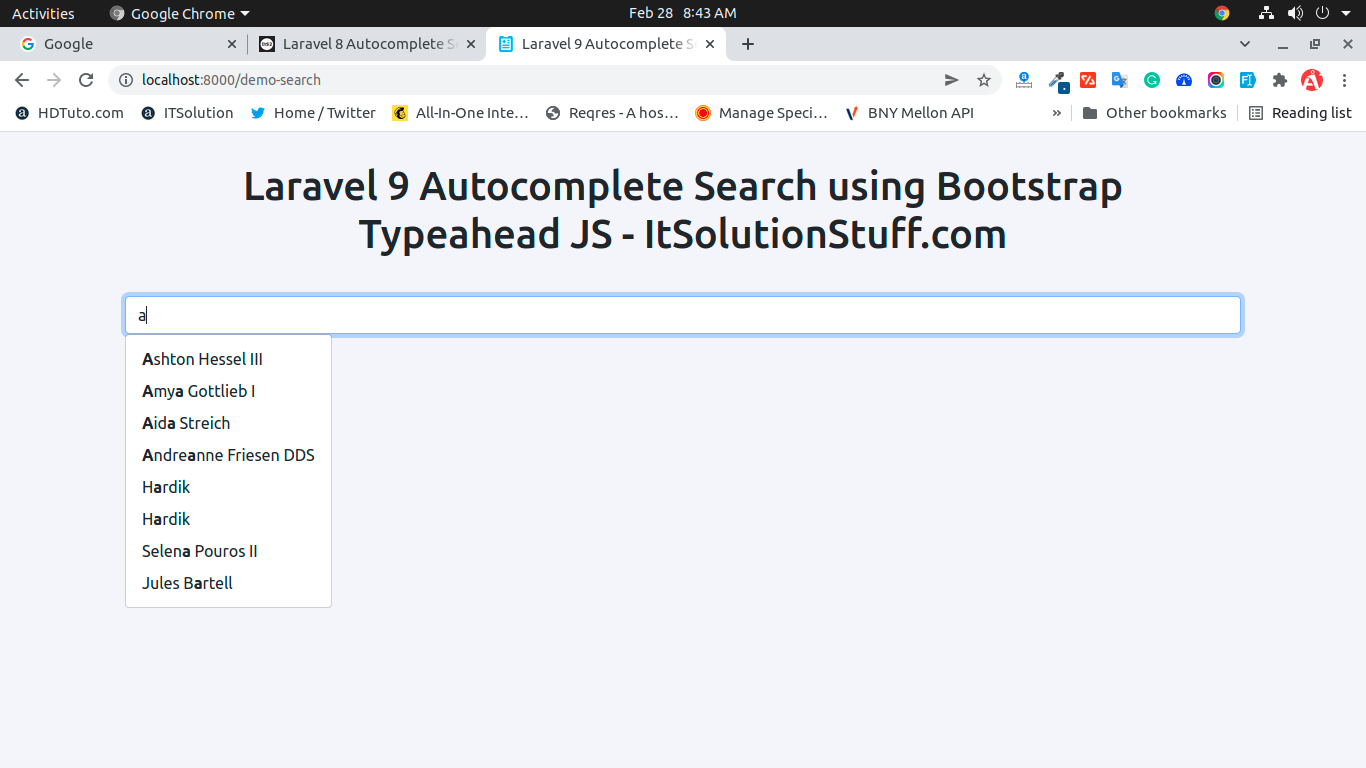
Now, Go to your web browser, type the given URL and view the app output:
Read Also: [Laravel 9 Livewire CRUD using Jetstream & Tailwind CSS](https://www.itsolutionstuff.com/post/laravel-9-livewire-crud-using-jetstream-tailwind-cssexample.html)
```
http://localhost:8000/demo-search
```
Output:
I hope it can help you...