# Laravel 9 Pagination Example Tutorial

Hello Dev,

This tutorial will give you an example of laravel 9 pagination example blade. I explained simply about laravel 9 pagination bootstrap 5 example. This tutorial will give you a simple example of the laravel 9 pagination tailwind example. you will learn how to add pagination in laravel 9. So, let's follow a few steps to create an example of how to create pagination in laravel 9.

We know pagination is a primary requirement of each and every project. so if you are a beginner with laravel then you must know how to use pagination in laravel 9 and what is another function can use with laravel 9 pagination.

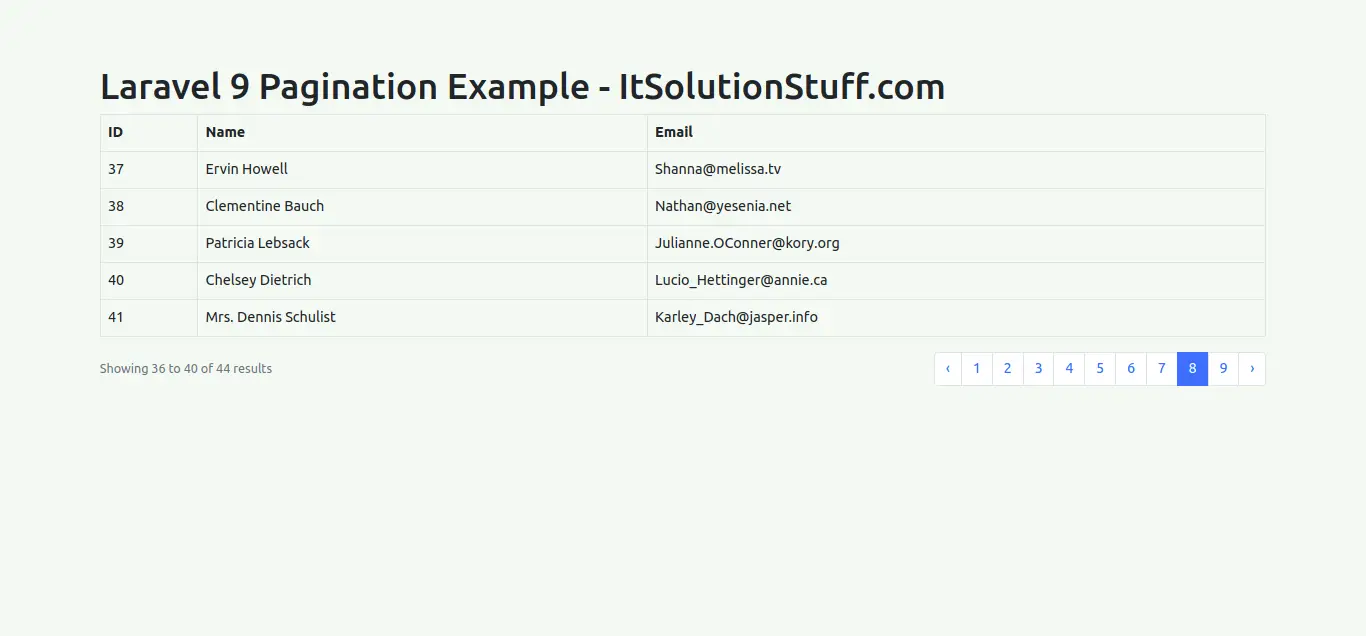
In this example, we will run the migration and create a "users" table. Then we will create dummy records using the tinker command. Then we will display that users with pagination. by default laravel pagination use Tailwind CSS design, we will use bootstrap 5 design for pagination here.

So, let's follow below tutorials:

![](https://www.itsolutionstuff.com/upload/laravel-9-pagination-example.png)

**Step 1: Install Laravel 9**

This is optional; however, if you have not created the laravel app, then you may go ahead and execute the below command:

```
composer create-project laravel/laravel example-app
```

**Step 2: Database Configuration**

In second step, we will make database configuration for example database name, username, password etc for our crud application of laravel 9. So let's open .env file and fill all details like as bellow:

.env

```
DB_CONNECTION=mysqlDB_HOST=127.0.0.1DB_PORT=3306DB_DATABASE=here your database name(blog)DB_USERNAME=here database username(root)DB_PASSWORD=here database password(root)
```

Read Also: [Laravel 9 Eloquent Mutators and Accessors Example](https://www.itsolutionstuff.com/post/laravel-9-eloquent-mutators-and-accessors-exampleexample.html)

**Step 3: Create Dummy Users**

In this step, we need to run migration command to create users table and then create dummy users records so we can see pagination.

Let's run migration command:

```
php artisan migrate
```

Next, run ticker command to add dummy users:

```
php artisan tinkerUser::factory()->count(100)->create()
```

**Step 4: Add Route**

First thing is we put one route in one for list users with pagination. So simple add both routes in your route file.

routes/web.php

```
<?php  use Illuminate\Support\Facades\Route;  use App\Http\Controllers\UserController;  /*|--------------------------------------------------------------------------| Web Routes|--------------------------------------------------------------------------|| Here is where you can register web routes for your application. These| routes are loaded by the RouteServiceProvider within a group which| contains the "web" middleware group. Now create something great!|*/  Route::get('users', [UserController::class, 'index']);
```

**Step 5: Create Controller**

Same things as above for route, here we will add one new method for route. index() will return users with pagination data, so let's add bellow:

app/Http/Controllers/UserController.php

```
<?php  namespace App\Http\Controllers;  use Illuminate\Http\Request;use App\Models\User;  class UserController extends Controller{    /**     * Display a listing of the resource.     *     * @return \Illuminate\Http\Response     */    public function index(Request $request)    {        $users = User::paginate(5);          return view('users', compact('users'));    }}
```

**Step 6: Create Blade File**

In this step, you need to create users blade file and put bellow code with links() so it will generate pagination automatically. So let's put it.

resources/views/users.blade.php

```
<!DOCTYPE html><html><head>    <title>Laravel 9 Pagination Example - ItSolutionStuff.com</title>    <link href="https://cdnjs.cloudflare.com/ajax/libs/twitter-bootstrap/5.0.1/css/bootstrap.min.css" rel="stylesheet"></head><body>      <div class="container">    <h1>Laravel 9 Pagination Example - ItSolutionStuff.com</h1>      <table class="table table-bordered data-table">        <thead>            <tr>                <th>ID</th>                <th>Name</th>                <th>Email</th>            </tr>        </thead>        <tbody>            @forelse($users as $user)                <tr>                    <td>{{ $user->id }}</td>                    <td>{{ $user->name }}</td>                    <td>{{ $user->email }}</td>                </tr>            @empty                <tr>                    <td colspan="3">There are no users.</td>                </tr>            @endforelse        </tbody>    </table>      <!--         You can use Tailwind CSS Pagination as like here:        {!! $users->withQueryString()->links() !!}            -->      {!! $users->withQueryString()->links('pagination::bootstrap-5') !!}</div>     </body>     </html>
```

**Run Laravel App:**

All the required steps have been done, now you have to type the given below command and hit enter to run the Laravel app:

```
php artisan serve
```

Now, Go to your web browser, type the given URL and view the app output:

```
http://localhost:8000/users
```

[![](https://go.ezodn.com/charity/http/charity-ads.s3.amazonaws.com/charity_ads/1079/234x60.png)](https://go.ezodn.com/ads/charity/proxy?p_id=5c41a748-c067-479e-6e5b-865bfa99e80b\&d_id=77568\&imp_id=5835009002109161\&c_id=1079\&l_id=10016\&url=https%3A%2F%2Fwww.directrelief.org%2Femergency%2Fukraine-crisis%2F\&ffid=1\&co=VN)

Output:
![](https://www.itsolutionstuff.com/upload/laravel-9-pagination-example-2.png)

If you need advance used of pagination then you can see bellow how to use.

Pagination with appends parameter

```
{!! $data->appends(['sort' => 'votes'])->links() !!}
```

Pagination with appends request all parameters

Read Also: [Laravel 9 Multi Auth: Create Multiple Authentication in Laravel](https://www.itsolutionstuff.com/post/laravel-9-multi-auth-create-multiple-authentication-in-laravelexample.html)

```
{!! $data->appends(Request::all())->links() !!}
```

I hope it can help you....


---

# Agent Instructions: Querying This Documentation

If you need additional information that is not directly available in this page, you can query the documentation dynamically by asking a question.

Perform an HTTP GET request on the current page URL with the `ask` query parameter:

```
GET https://learnphp.gitbook.io/learnphp/learn-lavarel/laravel-9-pagination-example-tutorial.md?ask=<question>
```

The question should be specific, self-contained, and written in natural language.
The response will contain a direct answer to the question and relevant excerpts and sources from the documentation.

Use this mechanism when the answer is not explicitly present in the current page, you need clarification or additional context, or you want to retrieve related documentation sections.
