
Laravel 9 Fullcalendar Ajax Tutorial Example
https://www.itsolutionstuff.com/post/laravel-9-fullcalendar-ajax-tutorial-exampleexample.html
Laravel 9 Fullcalendar Ajax Tutorial Example
By Hardik Savani March 26, 2022 Category : Laravel PauseUnmuteLoaded: 1.11%Fullscreen
 Hi,
Hi,
This post will give you example of laravel 9 fullcalendar example. we will help you to give example of laravel 9 fullcalendar crud example. In this article, we will implement a laravel 9 fullcalendar ajax. you can understand a concept of laravel 9 fullcalendar event click.
In this example, we will simply create a crud application with full calendar so you can easily create events, edit events by drag and drop and delete event. in this example, we will create an events table with a start, edit date, and title column. then you can add, edit and delete that event with the database.
Let's follow few step to make it laravel fullcalender crud app:
Step 1: Install Laravel 9
This is optional; however, if you have not created the laravel app, then you may go ahead and execute the below command:
Step 2: Create Migration and Model
In this step we have to create migration for events table using Laravel 9 php artisan command, so first fire bellow command:
After this command you will find one file in following path "database/migrations" and you have to put bellow code in your migration file for create events table.
Then after, simply run migration:
After create "events" table you should create Event model for items, so first create file in this path "app/Models/Event.php" and put bellow content in Event.php file:
app/Models/Event.php
Read Also: Laravel 9 Markdown | Laravel 9 Send Email using Markdown Mailables
Step 3: Create Controller File
Now require to create new FullCalenderController for index and ajax method so first run bellow command :
After this command you can find FullCalenderController.php file in your app/Http/Controllers directory. open FullCalenderController.php file and put bellow code in that file.
app/Http/Controllers/FullCalenderController.php
Step 4: Create Routes
In this step we will add routes and controller file so first add bellow route in your routes.php file.
routes/web.php
Step 5: Create Blade File
Ok, in this last step we will create fullcalender.blade.php file for display fullcalender and we will write js code for crud app. So first create fullcalender.blade.php file and put bellow code:
resources/views/fullcalender.blade.php
Run Laravel App:
All the required steps have been done, now you have to type the given below command and hit enter to run the Laravel app:
Now, Go to your web browser, type the given URL and view the app output:
Read Also: Laravel 9 One to Many Eloquent Relationship Tutorial
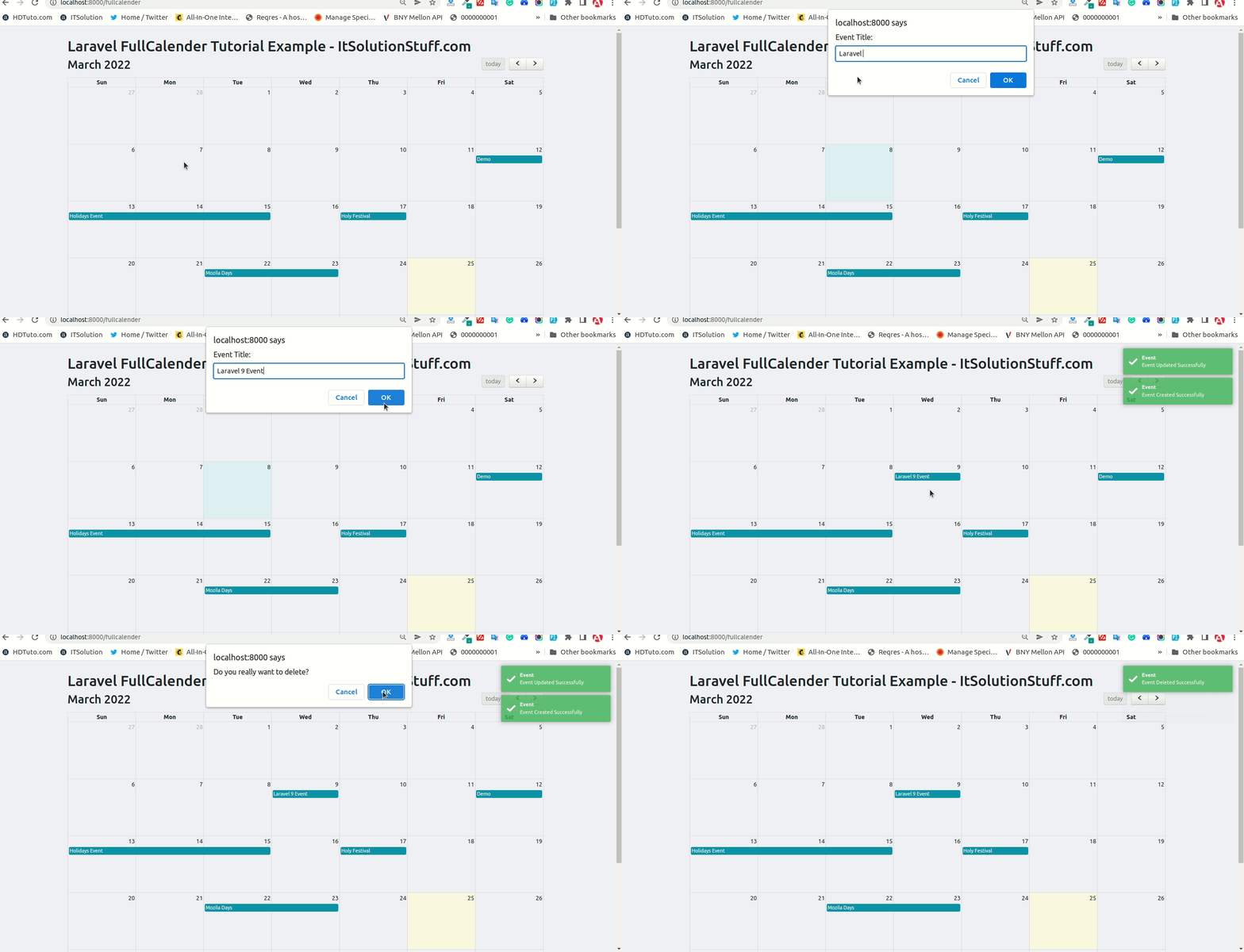
Output:
I hope it can help you...
Last updated