<?php
use App\Http\Controllers\MailController;
use Illuminate\Support\Facades\Route;
/*
|--------------------------------------------------------------------------
| Web Routes
|--------------------------------------------------------------------------
|
| Here is where you can register web routes for your application. These
| routes are loaded by the RouteServiceProvider within a group which
| contains the "web" middleware group. Now create something great!
|
 */
Route::get('/', function () {
  return view('welcome');
});
Route::get('send-mail', [MailController::class, 'index']);
In this quick example, let's see laravel 9 send email example. if you want to see an example of laravel 9 send mail example then you are the right place. This post will give you a simple example of sending an email in laravel 9 smtp. if you have a question about laravel 9 send mail smtp example then I will give a simple example with a solution.
Laravel 9 provides an inbuilt mail configuration for sending emails. you can use several drivers for sending email in laravel 9. you can use smtp, Mailgun, Postmark, Amazon SES, and send email. you have to configure on the env file what driver you want to use.
In this tutorial, I will give you step by step instructions to send emails in laravel 9. you can create blade file design and also with dynamic information for mail layout. so let's see step by step guide and send an email to your requirement.
Step 1: Install Laravel 9
This step is not required; however, if you have not created the laravel app, then you may go ahead and execute the below command:
Step 2: Make Configuration
In first step, you have to add send mail configuration with mail driver, mail host, mail port, mail username, mail password so laravel 9 will use those sender configuration for sending email. So you can simply add as like following.
In this step we will create mail class DemoMail for email sending. Here we will write code for which view will call and object of user. So let's run bellow command.
now, let's update code on DemoMail.php file as bellow:
app/Mail/DemoMail.php
Step 4: Create Controller
In this step, we will create MailController with index() method where we write code for sending mail to given email address. so first let's create controller by following command and update code on it.
Now, update code on MailController file.
app/Http/Controllers/MailController.php
Step 5: Create Routes
In this step, we need to create routes for list of sending email. so open your "routes/web.php" file and add following route.
routes/web.php
Step 6: Create Blade View
In this step, we will create blade view file and write email that we want to send. now we just write some dummy text. create bellow files on "emails" folder.
resources/views/emails/demoMail.blade.php
Run Laravel App:
All the required steps have been done, now you have to type the given below command and hit enter to run the Laravel app:
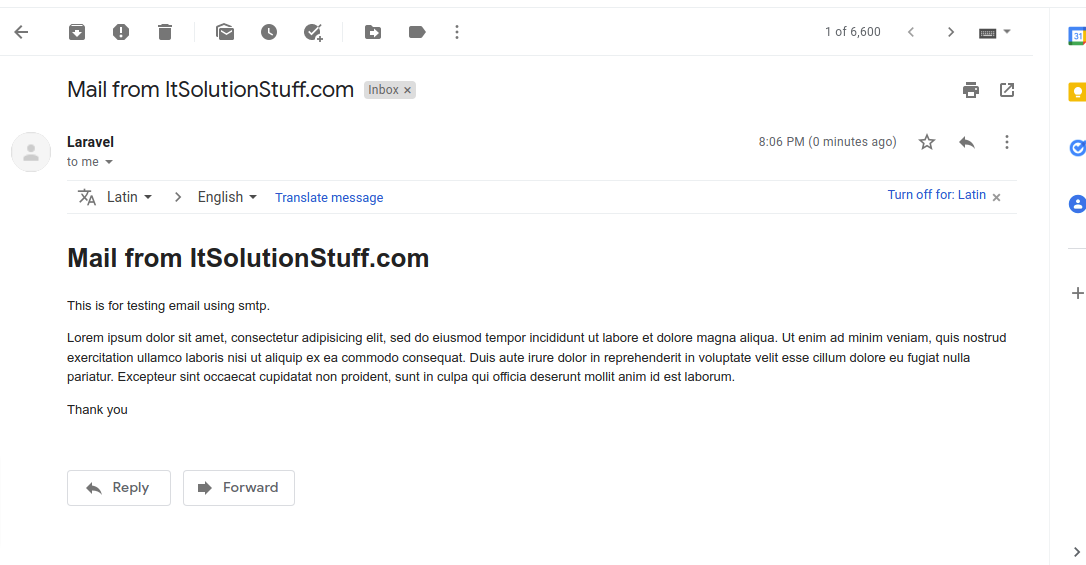
Now, Go to your web browser, type the given URL and view the app output:
<!DOCTYPE html>
<html>
	<head>
		<title>ItsolutionStuff.com</title>
	</head>
	<body>
		<h1>{{ $mailData['title'] }}</h1>
		<p>{{ $mailData['body'] }}</p>
		<p>Lorem ipsum dolor sit amet, consectetur adipisicing elit, sed do eiusmod tempor incididunt ut labore et dolore magna aliqua. Ut enim ad minim veniam, quis nostrud exercitation ullamco laboris nisi ut aliquip ex ea commodo consequat. Duis aute irure dolor in reprehenderit in voluptate velit esse cillum dolore eu fugiat nulla pariatur. Excepteur sint occaecat cupidatat non proident, sunt in culpa qui officia deserunt mollit anim id est laborum.</p>
		<p>Thank you</p>
	</body>
</html>
<?php
namespace App\Mail;
use Illuminate\Bus\Queueable;
use Illuminate\Mail\Mailable;
use Illuminate\Queue\SerializesModels;
class DemoMail extends Mailable {
  use Queueable, SerializesModels;
  public $mailData;
  /**
   * Create a new message instance.
   *
   * @return void
   */
  public function __construct($mailData) {
    $this->mailData = $mailData;
  }
  /**
   * Build the message.
   *
   * @return $this
   */
  public function build() {
    return $this->subject('Mail from ItSolutionStuff.com')->view('emails.demoMail');
  }
}
<?php
namespace App\Http\Controllers;
use App\Mail\DemoMail;
use Mail;
class MailController extends Controller {
  /**
   * Write code on Method
   *
   * @return response()
   */
  public function index() {
    $mailData = [
      'title' => 'Mail from ItSolutionStuff.com',
      'body'  => 'This is for testing email using smtp.',
    ];
    Mail::to('phamngoctuong1805@gmail.com')->send(new DemoMail($mailData));
    dd("Email is sent successfully.");
  }
}
<?php namespace App\Mail; use Illuminate\Bus\Queueable;use Illuminate\Contracts\Queue\ShouldQueue;use Illuminate\Mail\Mailable;use Illuminate\Queue\SerializesModels; class DemoMail extends Mailable{ use Queueable, SerializesModels; public $mailData; /** * Create a new message instance. * * @return void */ public function __construct($mailData) { $this->mailData = $mailData; } /** * Build the message. * * @return $this */ public function build() { return $this->subject('Mail from ItSolutionStuff.com') ->view('emails.demoMail'); }}
php artisan make:controller MailController
<?php namespace App\Http\Controllers; use Illuminate\Http\Request;use Mail;use App\Mail\DemoMail; class MailController extends Controller{ /** * Write code on Method * * @return response() */ public function index() { $mailData = [ 'title' => 'Mail from ItSolutionStuff.com', 'body' => 'This is for testing email using smtp.' ]; Mail::to('your_email@gmail.com')->send(new DemoMail($mailData)); dd("Email is sent successfully."); }}
<?php use Illuminate\Support\Facades\Route; use App\Http\Controllers\MailController; /*|--------------------------------------------------------------------------| Web Routes|--------------------------------------------------------------------------|| Here is where you can register web routes for your application. These| routes are loaded by the RouteServiceProvider within a group which| contains the "web" middleware group. Now create something great!|*/ Route::get('send-mail', [MailController::class, 'index']);
<!DOCTYPE html><html><head> <title>ItsolutionStuff.com</title></head><body> <h1>{{ $mailData['title'] }}</h1> <p>{{ $mailData['body'] }}</p> <p>Lorem ipsum dolor sit amet, consectetur adipisicing elit, sed do eiusmod tempor incididunt ut labore et dolore magna aliqua. Ut enim ad minim veniam, quis nostrud exercitation ullamco laboris nisi ut aliquip ex ea commodo consequat. Duis aute irure dolor in reprehenderit in voluptate velit esse cillum dolore eu fugiat nulla pariatur. Excepteur sint occaecat cupidatat non proident, sunt in culpa qui officia deserunt mollit anim id est laborum.</p> <p>Thank you</p></body></html>