Laravel Mailchimp api integration from scratch with example
By Hardik Savani June 9, 2016 Category : Laravel Mailchimp APIPlayUnmuteLoaded: 1.20%FullscreenIn this post you can learn how to integrate mailchimp api in your laravel 5 application. Mailchimp provides manage subscribers, send emails using campaign and also track email results etc. Mailchimp through you can track how much subscribers open email and read. If you have newsletter website or any tutorial website then you should add email subscriber function that way we can inform through email.
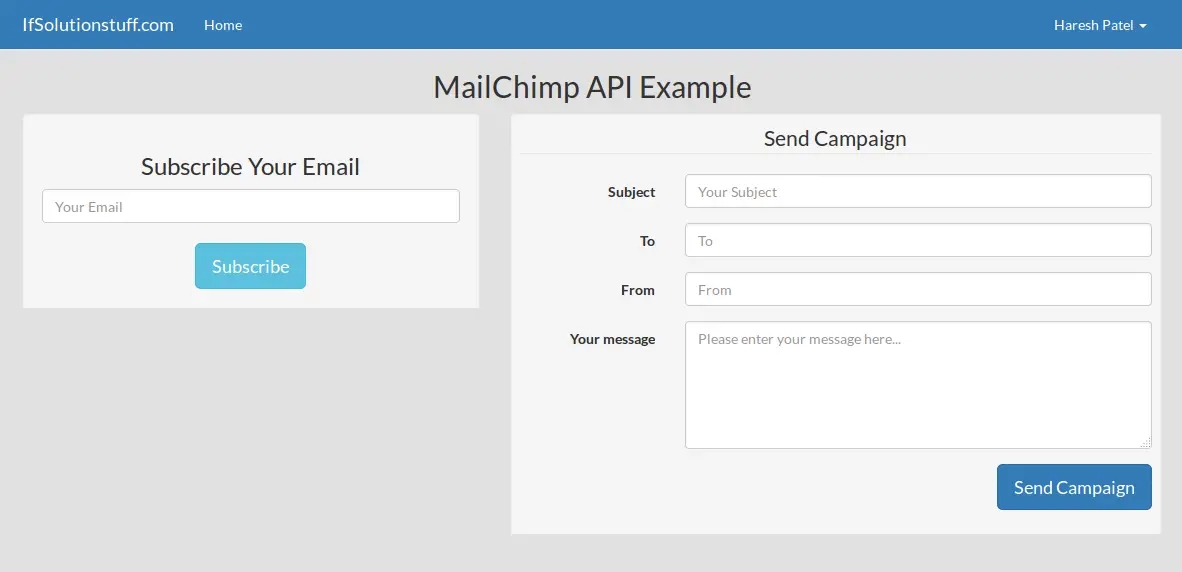
I use skovmand/mailchimp-laravel laravel package for mailchimp api in laravel 5 application. In this example you can subscriber email and send campaign from laravel application from scratch, so if you don't know how to do then it's very simple to do. you can see bellow perview after finish few step and you will see like bellow preview in your laravel 5 website.
Preview:
Step 1: Create MailChimp Account Setting
If you are from scratch, i mean if you don't have account then you can create new account from here : Create New Account.
Ok, now you have to create new List, click on Lists on menu and create new list. After create successfully lists then select your list, got to settings->List name and defaults and copy your list id, we will use it on api.
Now we can get API Key so click here and get api key : API Key
Open your .env file and paste here this way:
.env
Step 2: Install Package
In this step we will install skovmand/mailchimp-laravel package for use MailChimp api methods. so first fire bellow command in your cmd or terminal:
Now we need to add provider path and alias path in config/app.php file so open that file and add bellow code.
In this step we will add new three route for creating small example that way we can undestand very well. one for layout, second one for subscribe and last one for send campaign. so first add bellow route in your routes.php file.
app/Http/routes.php
Step 4: Add Controller
In this step we will add MailChimpController file for our example. you can copy whole controller file then also you can just copy and paste.
app/Http/Controllers/MailChimpController.php
Step 5: Add Blade file
This is a last step and you have to just create new blade file mailchimp.blade.php and put bellow code on that file.
APP_ENV=localAPP_DEBUG=trueAPP_KEY=HZoXrOanofcjLSbmF67kVtJyVHMFE3XUDB_HOST=127.0.0.1DB_DATABASE=learnDB_USERNAME=rootDB_PASSWORD=rootMAILCHIMP_API_KEY=API Key Here

 PlayUnmuteLoaded: 1.20%Fullscreen
 In this post you can learn how to integrate mailchimp api in your laravel 5 application. Mailchimp provides manage subscribers, send emails using campaign and also track email results etc. Mailchimp through you can track how much subscribers open email and read. If you have newsletter website or any tutorial website then you should add email subscriber function that way we can inform through email.