By Hardik Savani July 16, 2021 Category : LaravelPlayUnmuteLoaded: 0.17%FullscreenHi,
In this tutorial, i will show you laravel social media share buttons. I’m going to show you about social media share buttons laravel. We will look at example of how to add social media share buttons in laravel. if you have question about laravel social share buttons then i will give simple example with solution. Let's get started with jorenvanhocht laravel share example.
Here we will use jorenvanhocht/laravel-share composer package for adding social media sharing buttons in laravel project. you can easily use this example with laravel 6, laravel 7, laravel 8 and laravel 9. jorenvanhocht/laravel-share provide social sharing option for facebook, twitter, linkedin, telegram, whatsapp and reddit.
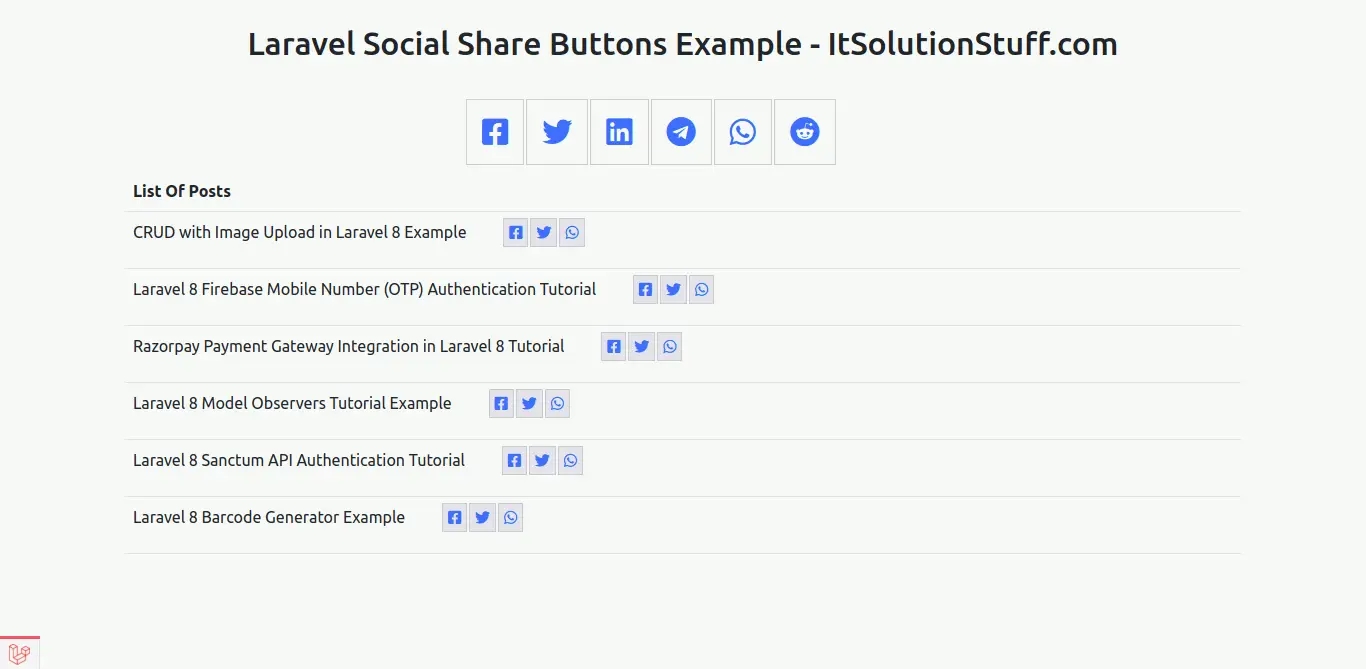
Let's see step by step bellow simple example and will get bellow layout:
<?php use Illuminate\Support\Facades\Route; use App\Http\Controllers\SocialShareController; /*|--------------------------------------------------------------------------| Web Routes|--------------------------------------------------------------------------|| Here is where you can register web routes for your application. These| routes are loaded by the RouteServiceProvider within a group which| contains the "web" middleware group. Now create something great!|*/Route::get('social-share', [SocialShareController::class, 'index']);
<?php namespace App\Http\Controllers; use Illuminate\Http\Request;use App\Models\Post; class SocialShareController extends Controller{ /** * Write code on Method * * @return response() */ public function index() { $shareButtons = \Share::page( 'https://www.itsolutionstuff.com', 'Your share text comes here', ) ->facebook() ->twitter() ->linkedin() ->telegram() ->whatsapp() ->reddit(); $posts = Post::get(); return view('socialshare', compact('shareButtons', 'posts')); }}
<!DOCTYPE html><html lang="{{ str_replace('_', '-', app()->getLocale()) }}"> <head> <meta charset="utf-8"> <meta name="viewport" content="width=device-width, initial-scale=1"> <title>Implement Social Share Button in Laravel - ItSolutionStuff.com</title> <link href="https://cdn.jsdelivr.net/npm/bootstrap@5.0.1/dist/css/bootstrap.min.css" rel="stylesheet"> <link rel="stylesheet" href="https://cdnjs.cloudflare.com/ajax/libs/font-awesome/5.15.3/css/all.min.css"/> <style> .social-btn-sp #social-links { margin: 0 auto; max-width: 500px; } .social-btn-sp #social-links ul li { display: inline-block; } .social-btn-sp #social-links ul li a { padding: 15px; border: 1px solid #ccc; margin: 1px; font-size: 30px; } table #social-links{ display: inline-table; } table #social-links ul li{ display: inline; } table #social-links ul li a{ padding: 5px; border: 1px solid #ccc; margin: 1px; font-size: 15px; background: #e3e3ea; } </style> </head> <body> <div class="container mt-4"> <h2 class="mb-5 text-center">Laravel Social Share Buttons Example - ItSolutionStuff.com</h2> <div class="social-btn-sp"> {!! $shareButtons !!} </div> <table class="table"> <tr> <th>List Of Posts</th> </tr> @foreach($posts as $post) <tr> <td> {{ $post->title }} {!! Share::page(url('/post/'. $post->slug))->facebook()->twitter()->whatsapp() !!} </td> </tr> @endforeach </table> </div> </body></html>

 PlayUnmuteLoaded: 0.17%Fullscreen
 Hi,
Hi,