By Hardik Savani June 15, 2019 Category : PHP LaravelPlayUnmuteLoaded: 1.20%FullscreenToday, i would like to share you how to generate short url in laravel application. sometime we need to make shorten url string instead of long url. in this tutorial i will show you step by step how to create shorten a url in laravel 5 without any package. you can write your own script function for generator short link in laravel 6, laravel 7, laravel 8 and laravel 9.
If you are working with SMS or some where share with limited character and at that time if you need to share any url or link then you must have to generate shortener url. In your project it's need many times then you must have to implement module that can help to generate url shortener with your website domain.
You need to just follow step by step this tutorial, you will get very simple module for generate short link in laravel 5. i will also give you free download whole script.
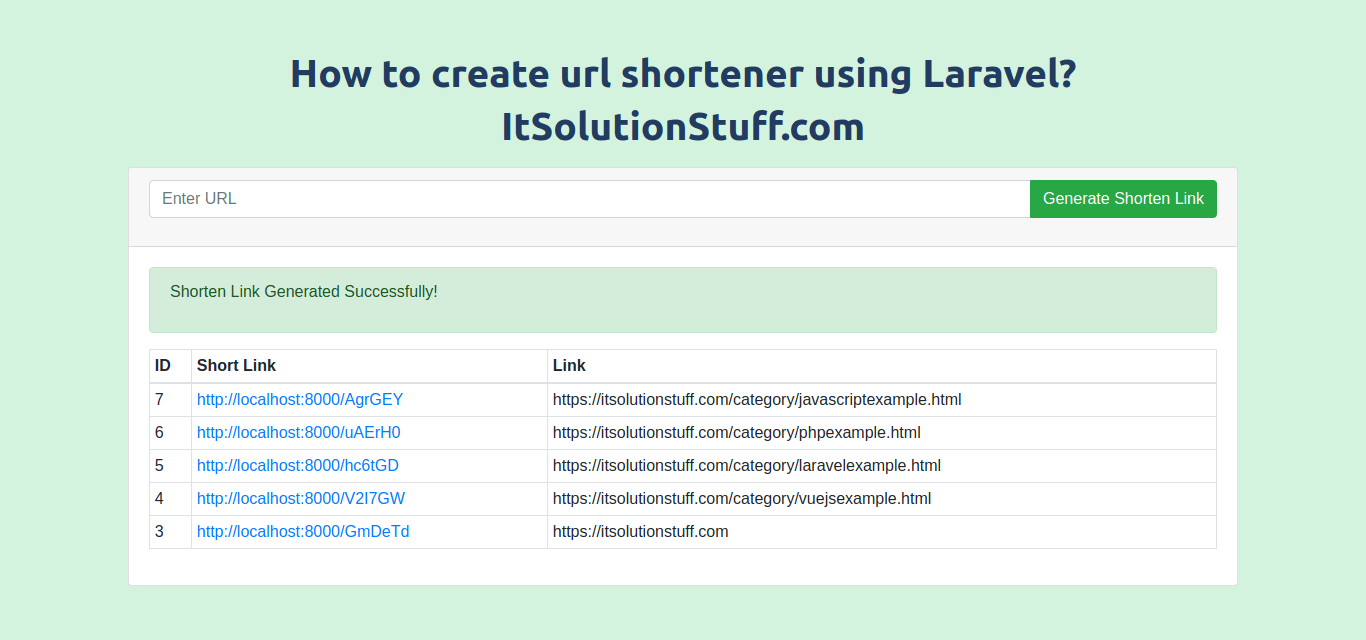
Preview:
Step 1: Install Laravel 5
In this step, if you haven't laravel 5 application setup then we have to get fresh laravel 5 application. So run bellow command and get clean fresh laravel 5 application.
Step 2: Create Table
we are going to create from scratch application for create short link. so we have to create migration for "short_links" table using Laravel 5.8 php artisan command, so first fire bellow command:
After this command you will find one file in following path "database/migrations" and you have to put bellow code in your migration file for create short_links table.
Now you have to run this migration by following command:
In this step, now we should create new model as ShortLink. So run bellow command and create new model. run bellow command:
app/ShortLink.php
Step 4: Create Route
In this is step we need to create route for layout file and another one for store data. so open your routes/web.php file and add following route.
routes/web.php
Step 5: Create Controller
In this point, now we should create new controller as ShortLinkController. this controller will manage layout and store data to database, so put bellow content in controller file:
app/Http/Controllers/ShortLinkController.php
Step 6: Create View
In Last step, let's create shortenLink.blade.php(resources/views/shortenLink.blade.php) for layout and we will write design code here and put following code:
resources/views/shortenLink.blade.php
Now we are ready to run our example so run bellow command ro quick run:
<?php use Illuminate\Support\Facades\Schema;use Illuminate\Database\Schema\Blueprint;use Illuminate\Database\Migrations\Migration; class CreateShortLinksTable extends Migration{ /** * Run the migrations. * * @return void */ public function up() { Schema::create('short_links', function (Blueprint $table) { $table->bigIncrements('id'); $table->string('code'); $table->string('link'); $table->timestamps(); }); } /** * Reverse the migrations. * * @return void */ public function down() { Schema::dropIfExists('short_links'); }}
php artisan migrate
php artisan make:model ShortLink
<?php namespace App; use Illuminate\Database\Eloquent\Model; class ShortLink extends Model{ /** * The attributes that are mass assignable. * * @var array */ protected $fillable = [ 'code', 'link' ];}

 PlayUnmuteLoaded: 1.20%Fullscreen
 Today, i would like to share you how to generate short url in laravel application. sometime we need to make shorten url string instead of long url. in this tutorial i will show you step by step how to create shorten a url in laravel 5 without any package. you can write your own script function for generator short link in laravel 6, laravel 7, laravel 8 and laravel 9.