> For the complete documentation index, see [llms.txt](https://learnphp.gitbook.io/learnphp/llms.txt). Markdown versions of documentation pages are available by appending `.md` to page URLs; this page is available as [Markdown](https://learnphp.gitbook.io/learnphp/laravel-advanced/how-to-generate-pdf-with-graph-in-laravel.md).
# How to Generate PDF with Graph in Laravel?
## How to Generate PDF with Graph in Laravel?
By Hardik Savani June 28, 2020 Category : LaravelPlayUnmuteLoaded: 1.17%Fullscreen[](https://vdo.ai/?utm_medium=video\&utm_term=itsolutionstuff.com\&utm_source=vdoai_logo)
This post is focused on how to show pdf graph show in laravel. We will use laravel pdf with charts example. i would like to show you laravel export chart to pdf. if you want to see example of generate pdf with graph in laravel then you are a right place.
you can easily create pdf file with image in laravel 6, laravel 7, laravel 8 and laravel 9.
When you work with big laravel application at time you may need to generate pdf file with chart in laravel. you might used google chart, chart js, highcharts etc with laravel. here i will show you step by step tutorial of how to generate pdf file with chart.
we will use wkhtmltopdf software to export chart to pdf in laravel. if you have large amount of data then you must have to use wkhtmltopdf. it will help you easily generate pdf file with images, chart and big data.
you can easily generate pdf file with laravel 6 and laravel 7 too.
Let's see bellow tutorial step by step:
Preview:
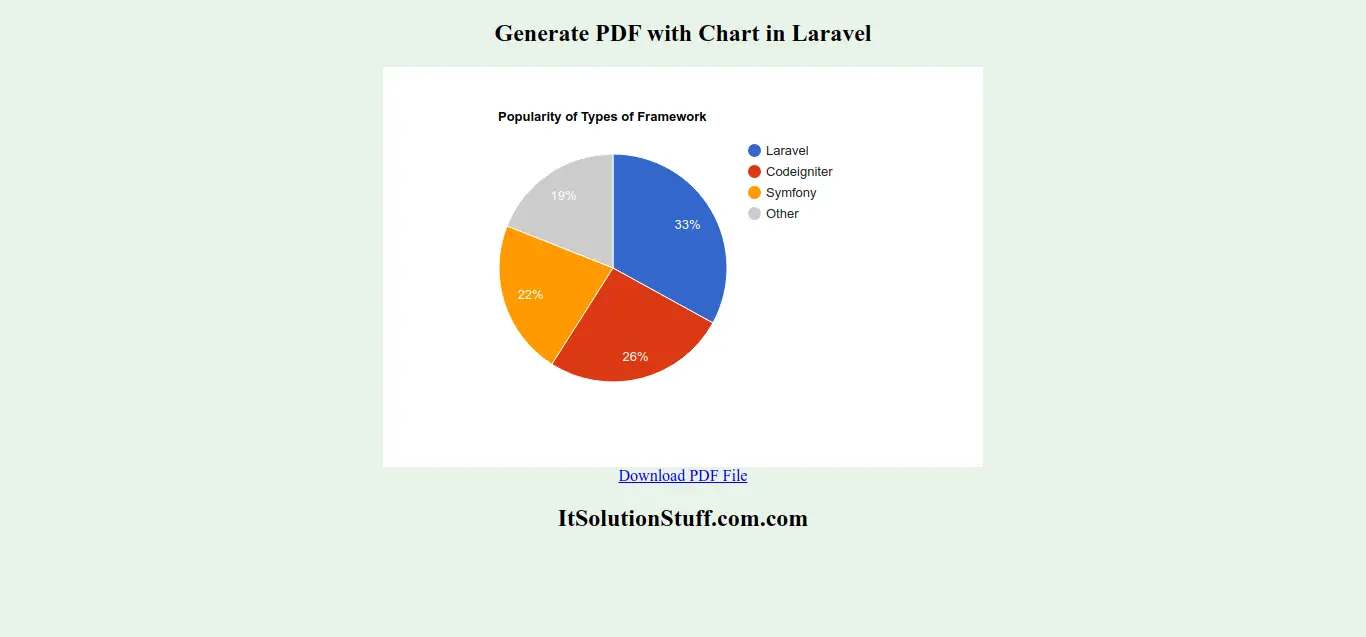
**Step 1: Install wkhtmltopdf**
here, we will install wkhtmltopdf software on our system. so let's install in ubuntu and windows as here bellow:
For Ubuntu:
```
sudo apt install wkhtmltopdf
```
For Windows:
you have to go bellow link and you will have to download exe from there.
```
https://wkhtmltopdf.org/
```
**Step 2: Install Laravel**
first of all we need to get fresh Laravel 7 version application using bellow command, So open your terminal OR command prompt and run bellow command:
```
composer create-project --prefer-dist laravel/laravel blog
```
Read Also: [Laravel 5 export to pdf using maatwebsite example](https://www.itsolutionstuff.com/post/laravel-5-export-to-pdf-using-maatwebsite-exampleexample.html)
**Step 3: Install mikehaertl/phpwkhtmltopdf**
now in this step, we will simply install mikehaertl/phpwkhtmltopdf to our laravel 7 application using bellow command:
```
composer require mikehaertl/phpwkhtmltopdf
```
**Step 4: Add Routes**
In this is step we need to create routes for view pdf content and download it listing. so open your "routes/web.php" file and add following route.
routes/web.php
```
Route::get('preview', 'PDFController@preview');Route::get('download', 'PDFController@download')->name('download');
```
**Step 5: Create Controller**
Here,we require to create new controller PDFController that will manage generatePDF method of route. So let's put bellow code.
app/Http/Controllers/PDFController.php
```
render(); $pdf = new Pdf; $pdf->addPage($render); $pdf->setOptions(['javascript-delay' => 5000]); $pdf->saveAs(public_path('report.pdf')); return response()->download(public_path('report.pdf')); }}
```
**Step 6: Create View File**
In Last step, let's create chart.blade.php(resources/views/chart.blade.php) with google chart and put following code:
resources/views/chart.blade.php
```
Generate PDF with Chart in Laravel
Download PDF File ItSolutionStuff.com.com
```
Now you can run using bellow command:
```
php artisan serve
```
Open bellow URL:
Read Also: [Laravel Livewire CRUD Application Tutorial](https://www.itsolutionstuff.com/post/laravel-livewire-crud-application-tutorialexample.html)
```
http://localhost:8000/preview
```
You will download file as like bellow:
I hope it can help you...