> For the complete documentation index, see [llms.txt](https://learnphp.gitbook.io/learnphp/llms.txt). Markdown versions of documentation pages are available by appending `.md` to page URLs; this page is available as [Markdown](https://learnphp.gitbook.io/learnphp/laravel-advanced/how-to-delete-multiple-records-using-checkbox-in-laravel-ok.md).
# How to Delete Multiple Records using Checkbox in Laravel? (ok)
C:\xampp\htdocs\reset\routes\web.php
```
name('home');
Route::get('myproducts', [ProductController::class, 'index']);
Route::delete('myproducts/{id}', [ProductController::class, 'destroy']);
Route::delete('myproductsDeleteAll', [ProductController::class, 'deleteAll']);
```
C:\xampp\htdocs\reset\app\Http\Controllers\ProductController.php
```
get();
return view('products', compact('products'));
}
/**
* Show the application dashboard.
*
* @return \Illuminate\Http\Response
*/
public function destroy($id) {
DB::table("products")->delete($id);
return response()->json(['success' => "Product Deleted successfully.", 'tr' => 'tr_' . $id]);
}
/**
* Show the application dashboard.
*
* @return \Illuminate\Http\Response
*/
public function deleteAll(Request $request) {
$ids = $request->ids;
$idsa = explode(",", $ids);
DB::table("products")->whereIn('id', $idsa)->delete();
return response()->json(['success' => "Products Deleted successfully."]);
}
}
```
C:\xampp\htdocs\reset\resources\views\products.blade.php
```
Laravel 5 - Multiple delete records with checkbox example
Laravel 5 - Multiple delete records with checkbox example
No
Product Name
Product Details
Action
@if($products->count())
@foreach($products as $key => $product)
```

## How to Delete Multiple Records using Checkbox in Laravel?
By Hardik Savani July 18, 2017 Category : PHP Laravel Bootstrap jQuery MySql AjaxPlayUnmuteLoaded: 1.17%Fullscreen[](https://vdo.ai/?utm_medium=video\&utm_term=itsolutionstuff.com\&utm_source=vdoai_logo)It's almost need to give feature for remove multiple records using checkbox, if you are developing e-commerce application or any big web application then you must give feature to delete multiple records.
So in this post, i will let you know how to delete multiple records with checkbox in laravel 5, laravel 6, laravel 7, laravel 8 and laravel 9 application. here i also give multiple delete and you can also delete single records. Few days ago i posted for confirmation before delete record, so you can read from here : [Laravel 5 - Confirmation before delete record from database example](http://itsolutionstuff.com/post/laravel-5-confirmation-before-delete-record-from-database-exampleexample.html).
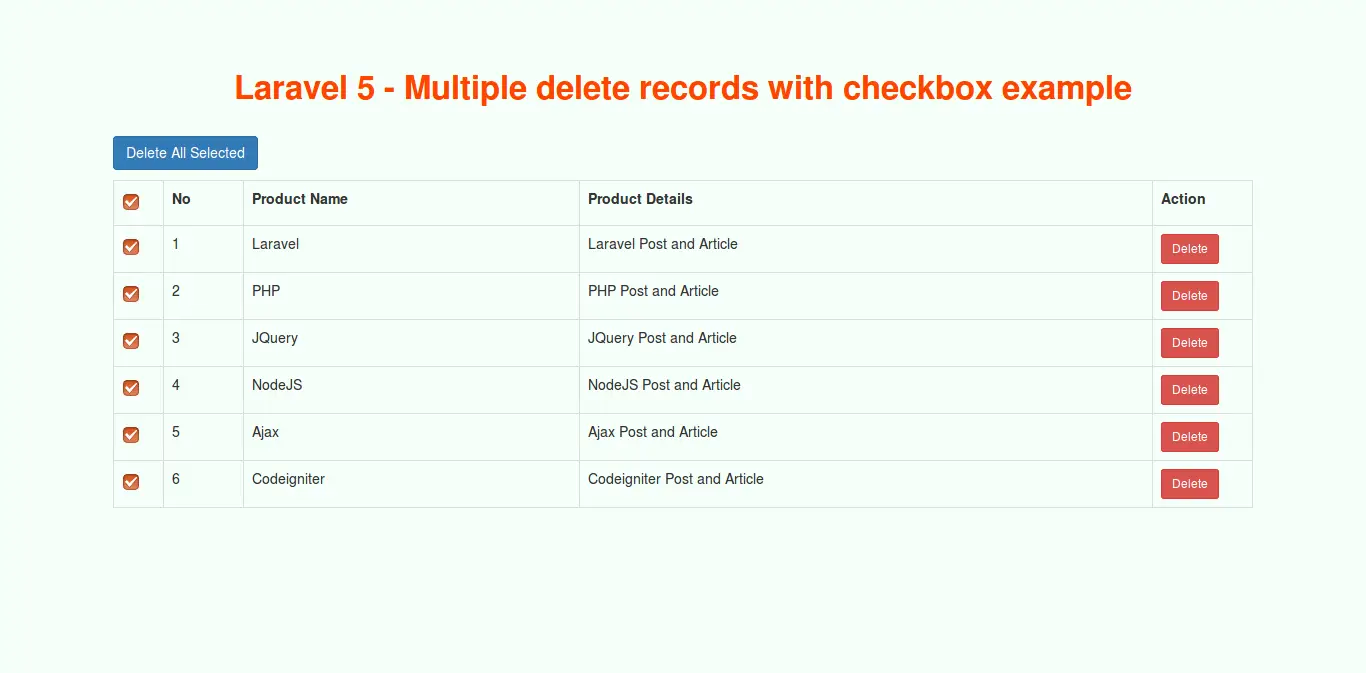
In this example, i simply created "products" table with id, name, details, created\_at and updated\_at columns. I also added mysql query for add dummy records. Here i use jquery for select all checkboxs and delete all records. So finally you have to follow some step and get the layout like as bellow.
**Preview:**
**Step 1: Create products Table with Dummy Records**
Here, you have to create "products" table then you can run mysql query for dummy records. You can create products table using migration and then also create some dummy records using seeder. So now i just simple sql query.
**Dummy Records Query:**
```
INSERT INTO `products` (`id`, `name`, `details`, `created_at`, `updated_at`) VALUES(1, 'Laravel', 'Laravel posts', NULL, NULL),(3, 'PHP', 'PHP posts', NULL, NULL),(4, 'JQuery', 'JQuery posts', NULL, NULL),(5, 'Bootstrap', 'Bootstrap posts', NULL, NULL),(6, 'Ajax', 'Ajax posts', NULL, NULL);
```
**Step 2: Create new Routes**
In this step, we are doing from scratch so we will add three routes, one for display data and another for delete request, then third for remove all selected data. So you have to simply add three new routes in your laravel application.
**routes/web.php**
```
Route::get('myproducts', 'ProductController@index');Route::delete('myproducts/{id}', 'ProductController@destroy');Route::delete('myproductsDeleteAll', 'ProductController@deleteAll');
```
Read Also: [How to add Delete cascade to existing column in Laravel 5, without remove column?](https://www.itsolutionstuff.com/post/how-to-add-delete-cascade-to-existing-column-in-laravel-5-without-remove-columnexample.html)
**Step 3: Add ProductController**
Here, we will create new ProductController file to handle request of created three new route. In this Controller we define three method, index(), destroy() and deleteAll(). method will handle route request. So let's create new controller and put code:
**app/Http/Controllers/ProductController.php**
```
get(); return view('products',compact('products')); } /** * Show the application dashboard. * * @return \Illuminate\Http\Response */ public function destroy($id) { DB::table("products")->delete($id); return response()->json(['success'=>"Product Deleted successfully.", 'tr'=>'tr_'.$id]); } /** * Show the application dashboard. * * @return \Illuminate\Http\Response */ public function deleteAll(Request $request) { $ids = $request->ids; DB::table("products")->whereIn('id',explode(",",$ids))->delete(); return response()->json(['success'=>"Products Deleted successfully."]); }}
```
**Step 4: Add Blade File**
In last step, we will create products.blade.php file and write code of jquery for delete and delete all function. So let's create products.blade.php file and put bellow code:
**resources/views/products.blade.php**
```
Laravel 5 - Multiple delete records with checkbox example
Laravel 5 - Multiple delete records with checkbox example
No
Product Name
Product Details
Action
@if($products->count()) @foreach($products as $key => $product)
```
Now we are ready to run our example so run bellow command for quick run:
```
php artisan serve
```
Now you can open bellow url on your browser:Read Also: [Laravel 5 email verification with activation code example](https://www.itsolutionstuff.com/post/laravel-5-email-verification-with-activation-code-exampleexample.html)
```
http://localhost:8000/myproducts
```
I hope it can help you....