By Hardik Savani October 1, 2019 Category : LaravelPauseUnmuteLoaded: 2.69%FullscreenDo you have issue like laravel 6 cors header ‘access-control-allow-origin’ missing or how to use cors middleware in laravel 6 than i will show you how to work with cors(Cross-Origin Resource Sharing) in laravel 6 application.
One my viewer sent me a message with screen shot "Access to XMLHttpRequest at 'http://localhost:8000/api/users' from origin 'null' has been blocked by CORS policy: No 'Access-Control-Allow-Origin' header is present on the requested resource." and he was told me when i was access my api from other project then it is show me error like this way.
However, i know the solution of he sent me message because i fetch many time this error and solved it using barryvdh/laravel-cors composer package with laravel 6. i sent him github like with barryvdh/laravel-cors package.
Than i thought i should share one tutorial with how to use cors middleware in laravel 6. so you can follow bellow tutorial and solved your error:
Create API Route
In this is step we need to create routes for testing. so open your "routes/api.php" file and add following route.
routes/api.php
User API to Another Project File
Now i am going to create new html file and try to access my api using jquery ajax. so you can see bellow file code that i written.
index.php
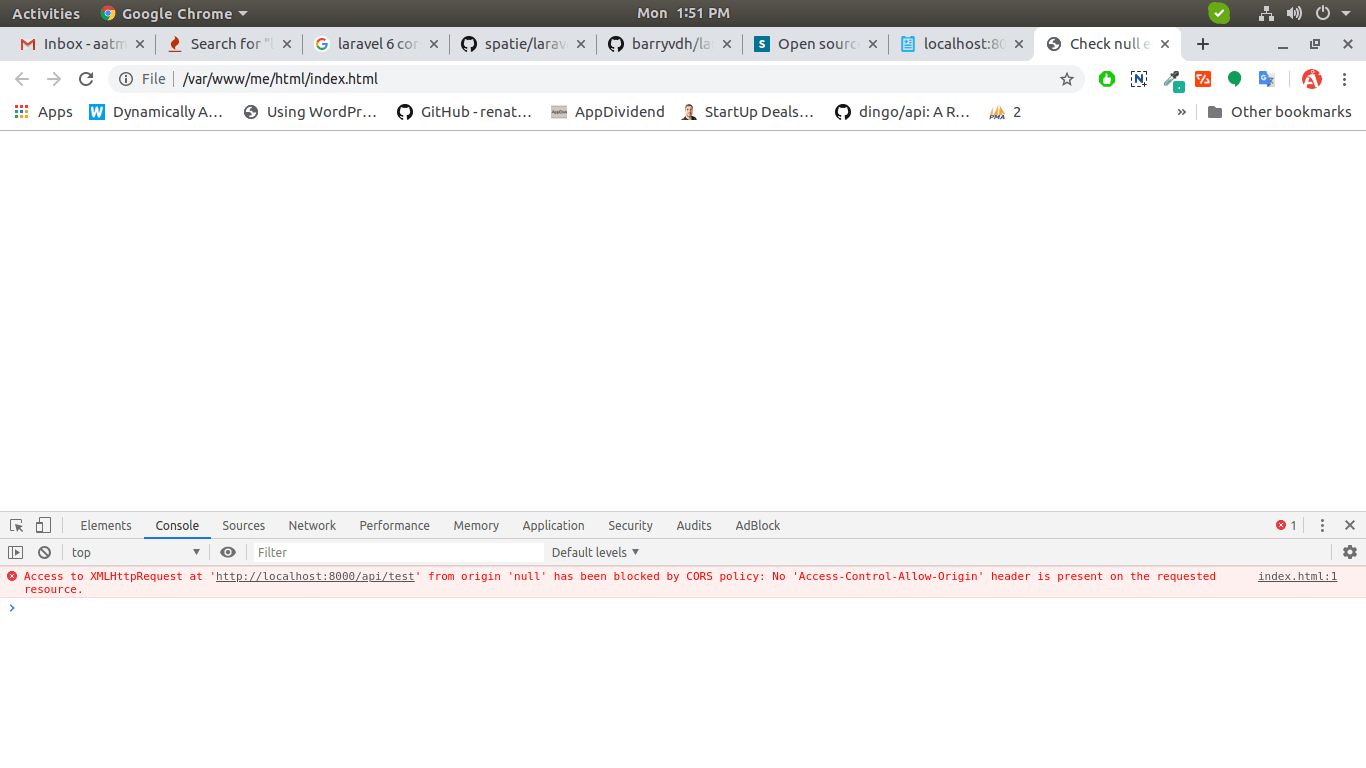
Ok, now if i run this file, it's give this error:
"Access to XMLHttpRequest at 'http://localhost:8000/api/test' from origin 'null' has been blocked by CORS policy: No 'Access-Control-Allow-Origin' header is present on the requested resource."
You can also see bellow screen shot.
Now we will resolve how to solve this error using barryvdh/laravel-cors composer package.
Install barryvdh/laravel-cors
first of all we will install barryvdh/laravel-cors composer package by following composer command in your laravel 6 application.
After successfully install package, open config/app.php file and add service provider and alias.

 PauseUnmuteLoaded: 2.69%Fullscreen
 Do you have issue like laravel 6 cors header ‘access-control-allow-origin’ missing or how to use cors middleware in laravel 6 than i will show you how to work with cors(Cross-Origin Resource Sharing) in laravel 6 application.