> For the complete documentation index, see [llms.txt](https://learnphp.gitbook.io/learnphp/llms.txt). Markdown versions of documentation pages are available by appending `.md` to page URLs; this page is available as [Markdown](https://learnphp.gitbook.io/learnphp/wordpress/api-create-application-passwords-ok.md).
# \[API] Create Application Passwords (ok)
https\://maheshwaghmare.com/doc/application-passwords/
Đọc thêm plugin ở đây :)
{% embed url="" %}
{% file src="/files/-MOAx138xytiVwIgTDdN" %}
In this article we are going to see all about the WordPress plugin [Application Passwords](https://wordpress.org/plugins/application-passwords/).
Create different applications with unique passwords for any user to manage the REST API & XML requests.
**Table of Content**
* [Overview](https://maheshwaghmare.com/doc/application-passwords/#overview)
* [Features](https://maheshwaghmare.com/doc/application-passwords/#features)
* [How to install?](https://maheshwaghmare.com/doc/application-passwords/#how-to-install)
* [Create an application for the user?](https://maheshwaghmare.com/doc/application-passwords/#create-an-application-for-the-user)
* [Examples of Application Passwords](https://maheshwaghmare.com/doc/application-passwords/#examples-of-application-passwords)
* [Create a post with Postman](https://maheshwaghmare.com/doc/application-passwords/#create-a-post-with-postman)
* [Create a post with CURL](https://maheshwaghmare.com/doc/application-passwords/#create-a-post-with-curl)
* [Create a post with wp\_remote\_post](https://maheshwaghmare.com/doc/application-passwords/#create-a-post-with-wp_remote_post)
* [Common Error & Solution](https://maheshwaghmare.com/doc/application-passwords/#common-error-solution)
### [#Overview](https://maheshwaghmare.com/doc/application-passwords/#overview) Overview
In simple basic authentication REST API & XML-RPC request we use the **username** and the **password** of the WordPress user.
[Application Passwords](https://wordpress.org/plugins/application-passwords/) provide a way to create multiple applications for each user to perform REST API authenticate requests without using users’ original passwords.
We have another plugin [JSON Basic Authentication](https://github.com/WP-API/Basic-Auth/) which allows us to perform basic authentication request.\
But JSON Basic Authentication uses the actual user password which is basically not useful for the live site.\
Read more about [performing basic authentication requests with JSON basic authentication plugin](https://maheshwaghmare.com/doc/basic-authentication/).
**NOTE**: **Application Passwords** is a Beta plugin in WordPress. So, I recommend avoiding using it on production sites. See [all beta plugins in WordPress](https://maheshwaghmare.com/beta-plugins/).
[Top ↑](https://maheshwaghmare.com/doc/application-passwords/#top)
### [#Features](https://maheshwaghmare.com/doc/application-passwords/#features) Features
* The application password generate a unique password for each application.
* We can able to create multiple applications for each user.
* We can remove any application for any time.
* No need for users’ original password for authentication.
**NOTE:** Application Passwords are **ONLY** used for authenticating **REST API** and **XML-RPC**requests. It will not work for regular site login.
[Top ↑](https://maheshwaghmare.com/doc/application-passwords/#top)
### [#How to install?](https://maheshwaghmare.com/doc/application-passwords/#how-to-install) How to install?
Follow below steps to install the Application Passwords.
* Go to **Plugins > Add new**
* Search for **Application Passwords**
* Click on **Install Now**
* and then click on **Activate** button
See below screenshot for reference: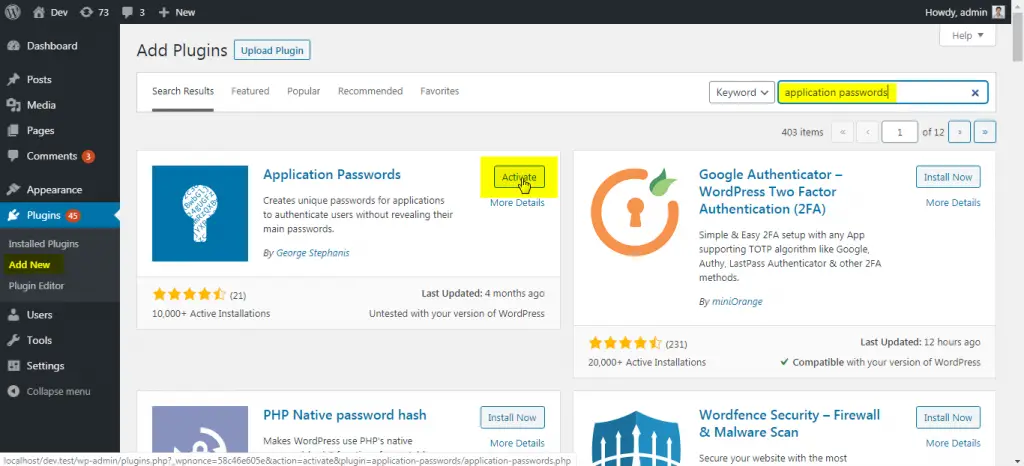Plugin Installation Screen
[Top ↑](https://maheshwaghmare.com/doc/application-passwords/#top)
### [#Create an application for the user?](https://maheshwaghmare.com/doc/application-passwords/#create-an-application-for-the-user) Create an application for the user?
To create a application password follow below steps:
* Go to **Users > Your Profile**
* Navigate to the **Application Passwords** section
* In input field add your application name. I have name my application as “**Example App**“
* Click on **Add New**
Checkout below screenshot for reference: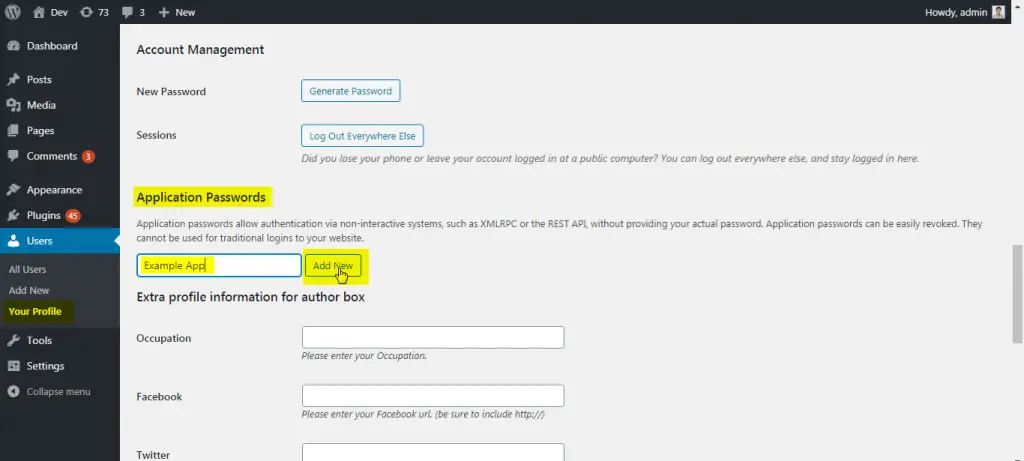Create a New Application
After clicking on **Add new** we can see the popup which show the message something like below: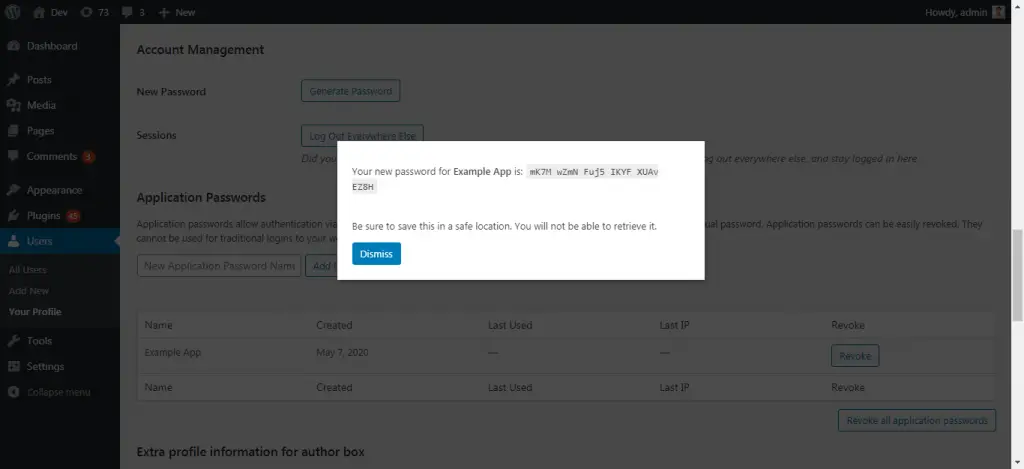Application Successful Creation Popup
Here my application password is generated as: `mK7M wZmN Fuj5 IKYF XUAv EZ8H`
**NOTE:** Save this application password. Because we’ll not see this anymore. If somehow you close it then you need to create new one.
[Top ↑](https://maheshwaghmare.com/doc/application-passwords/#top)
### [#Examples of Application Passwords](https://maheshwaghmare.com/doc/application-passwords/#examples-of-application-passwords) Examples of Application Passwords
Lets see how to use the Application Passwords with practical examples.
Here, I’m using Postman, CURL & wp\_remote\_post to demonstrate how we can create a new post with Rest API request.
#### [#Create a post with Postman](https://maheshwaghmare.com/doc/application-passwords/#create-a-post-with-postman) Create a post with Postman
* Open Postman
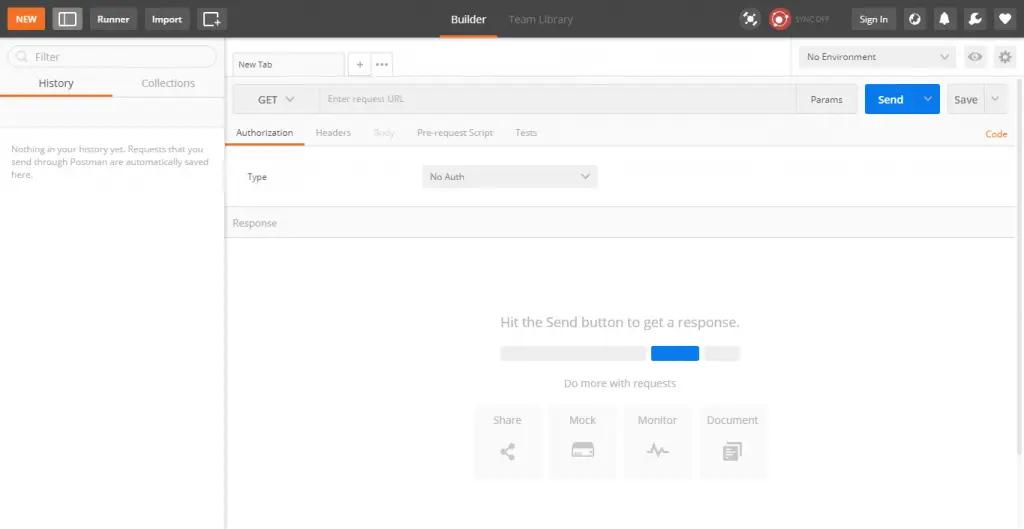Open Postman
* Select **GET** method
* Use your website URL
* Click on Send
You will see something like: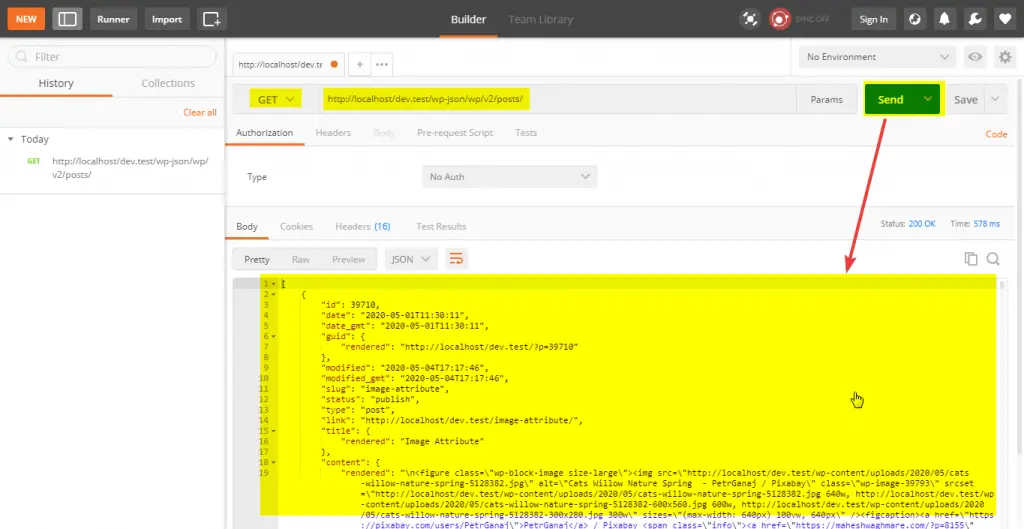Get All Posts
Here, We have not used Application Password anywhere. We have just get the list of all posts to check the Rest API is enabled or not on our website.
Most of the times Rest API is disabled by security plugins. So, you can enable the Rest API support form them.
We have now created a application passwords. So we can use it to send the Basic authentication request.
In this example we are going to create a new post with Basic authentication.
To create the post we can need to use endpoint .
In this example i’m just using only the `title` field to create a new post title.
You can see all available fields at –
Lets see how to do it.
* Set the **POST** method
* Add endpoint with **title** parameter and add post title like – `/wp-json/wp/v2/posts/?title=Rest API Post 1`
* Select Authentication type **Basic auth**
* Add your **username**
* Add your **application password**
**Note:** Here the username is which you use to login to your website. And application password is newly created application password. Im my case it is `mK7M wZmN Fuj5 IKYF XUAv EZ8H`.
* Click on **Send** button.
you can see something like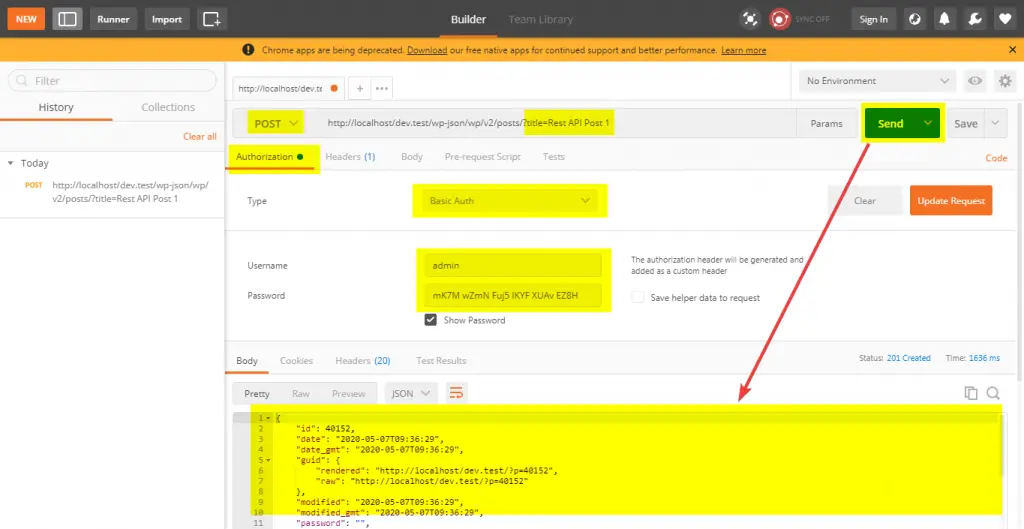Create a New Post Request
Now open your `draft` posts list. You can see our newly created post there.
E.g.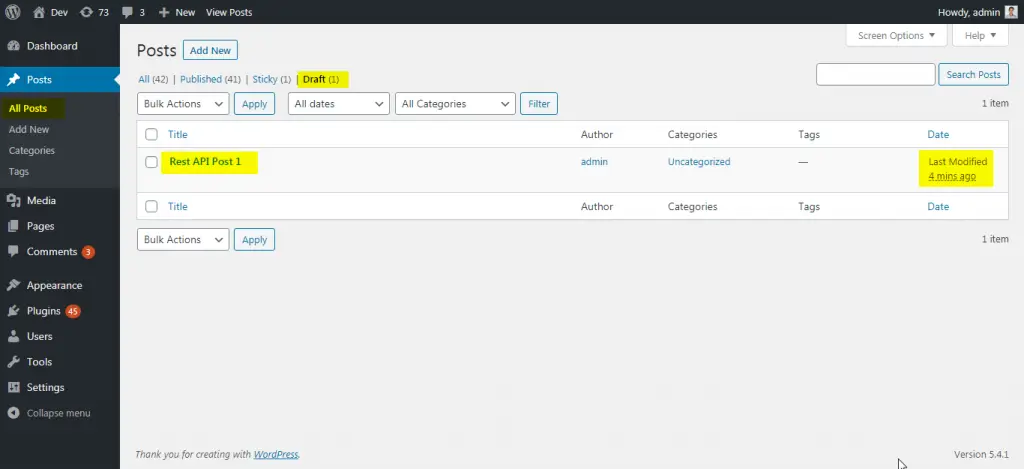Posts List Screen
[Top ↑](https://maheshwaghmare.com/doc/application-passwords/#top)
#### [#Create a post with CURL](https://maheshwaghmare.com/doc/application-passwords/#create-a-post-with-curl) Create a post with CURL
**Syntax**
```
curl --user "admin:{application password}" -X POST -d "title={Post Title}" http://example.com/wp-json/wp/v2/posts/Full Screen
```
**Example**
| | curl --user "admin:mK7M wZmN Fuj5 IKYF XUAv EZ8H" -X POST -d "title=Rest API Post 2" |
| - | ------------------------------------------------------------------------------------------------------------------------------------- |
[view raw](https://gist.github.com/maheshwaghmare/c956a8980e485b851dd3398ac3e960d6/raw/4deb719c0c21685f8643eb165670de970c1e8345/curl-request.bat)[curl-request.bat](https://gist.github.com/maheshwaghmare/c956a8980e485b851dd3398ac3e960d6#file-curl-request-bat) hosted with  by [GitHub](https://github.com/)
**Output:**
```
{"id":40155,"date":"2020-05-07T09:45:06","date_gmt":"2020-05-07T09:45:06","guid":{"rendered":"http:\/\/localhost\/dev.test\/?p=40155","raw":"http:\/\/localhost\/dev.test\/?p=40155"},"modified":"2020-05-07T09:45:06","modified_gmt":"2020-05-07T09:45:06","password":"","slug":"","status":"draft","type":"post","link":"http:\/\/localhost\/dev.test\/?p=40155","title":{"raw":"Rest API Post 2","rendered":"Rest API Post 2"},"content":{"raw":"","rendered":"","protected":false,"block_version":0},"excerpt":{"raw":"","rendered":"","protected":false},"author":1,"featured_media":0,"comment_status":"open","ping_status":"open","sticky":false,"template":"","format":"standard","meta":{"_kad_post_transparent":"","_kad_post_title":"","_kad_post_layout":"","_kad_post_sidebar_id":"","_kad_post_content_style":"","_kad_post_vertical_padding":"","_kad_post_feature":"","_kad_post_feature_position":"","_kad_post_header":false,"_kad_post_footer":false},"categories":[1],"tags":[],"permalink_template":"http:\/\/localhost\/dev.test\/%postname%\/","generated_slug":"rest-api-post-1","_links":{"self":[{"href":"http:\/\/localhost\/dev.test\/wp-json\/wp\/v2\/posts\/40155"}],"collection":[{"href":"http:\/\/localhost\/dev.test\/wp-json\/wp\/v2\/posts"}],"about":[{"href":"http:\/\/localhost\/dev.test\/wp-json\/wp\/v2\/types\/post"}],"author":[{"embeddable":true,"href":"http:\/\/localhost\/dev.test\/wp-json\/wp\/v2\/users\/1"}],"replies":[{"embeddable":true,"href":"http:\/\/localhost\/dev.test\/wp-json\/wp\/v2\/comments?post=40155"}],"version-history":[{"count":0,"href":"http:\/\/localhost\/dev.test\/wp-json\/wp\/v2\/posts\/40155\/revisions"}],"wp:attachment":[{"href":"http:\/\/localhost\/dev.test\/wp-json\/wp\/v2\/media?parent=40155"}],"wp:term":[{"taxonomy":"category","embeddable":true,"href":"http:\/\/localhost\/dev.test\/wp-json\/wp\/v2\/categories?post=40155"},{"taxonomy":"post_tag","embeddable":true,"href":"http:\/\/localhost\/dev.test\/wp-json\/wp\/v2\/tags?post=40155"}],"wp:action-publish":[{"href":"http:\/\/localhost\/dev.test\/wp-json\/wp\/v2\/posts\/40155"}],"wp:action-unfiltered-html":[{"href":"http:\/\/localhost\/dev.test\/wp-json\/wp\/v2\/posts\/40155"}],"wp:action-sticky":[{"href":"http:\/\/localhost\/dev.test\/wp-json\/wp\/v2\/posts\/40155"}],"wp:action-assign-author":[{"href":"http:\/\/localhost\/dev.test\/wp-json\/wp\/v2\/posts\/40155"}],"wp:action-create-categories":[{"href":"http:\/\/localhost\/dev.test\/wp-json\/wp\/v2\/posts\/40155"}],"wp:action-assign-categories":[{"href":"http:\/\/localhost\/dev.test\/wp-json\/wp\/v2\/posts\/40155"}],"wp:action-create-tags":[{"href":"http:\/\/localhost\/dev.test\/wp-json\/wp\/v2\/posts\/40155"}],"wp:action-assign-tags":[{"href":"http:\/\/localhost\/dev.test\/wp-json\/wp\/v2\/posts\/40155"}],"curies":[{"name":"wp","href":"https:\/\/api.w.org\/{rel}","templated":true}]}}Full Screen
```
E.g.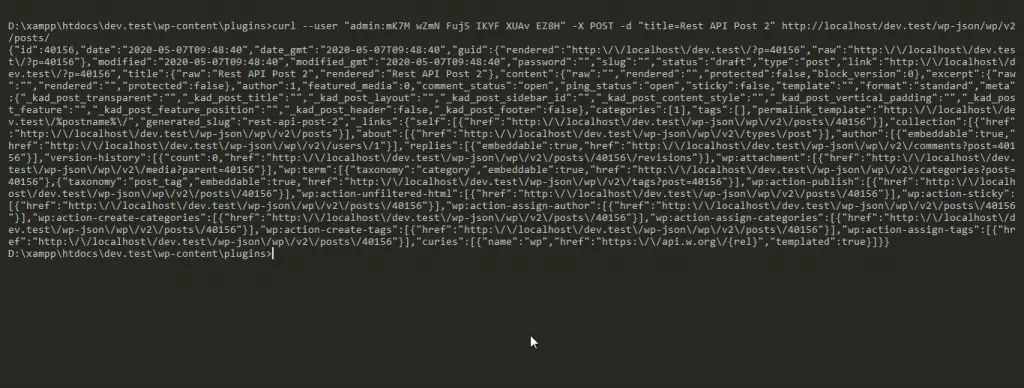Terminal API Request
**Output**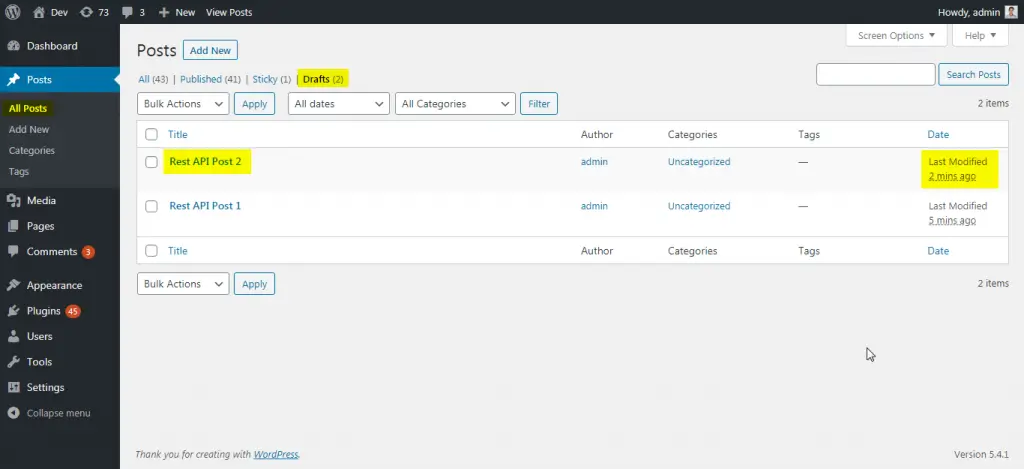Posts List Screen
[Top ↑](https://maheshwaghmare.com/doc/application-passwords/#top)
#### [#Create a post with wp\_remote\_post](https://maheshwaghmare.com/doc/application-passwords/#create-a-post-with-wp_remote_post) Create a post with wp\_remote\_post
Code:
| | \'; |
| | |
| | $request = wp\_remote\_post( $site\_url . 'wp-json/wp/v2/posts/', array( |
| | 'body' => array( |
| | 'title' => 'Rest API Post 3', |
| | ), |
| | 'headers' => array( |
| | 'Authorization' => 'Basic ' . base64\_encode( $username . ':' . $password ), |
| | ), |
| | ) ); |
| | } |
| | add\_action( 'admin\_head', 'prefix\_create\_new\_post' ); |
| | endif; |
[view raw](https://gist.github.com/maheshwaghmare/9e3e7806b345bebf9e3d84df64097cf1/raw/9c4362bb807f61a76da482fe01a238b03bf5efec/basic-auth-request.php)[basic-auth-request.php](https://gist.github.com/maheshwaghmare/9e3e7806b345bebf9e3d84df64097cf1#file-basic-auth-request-php) hosted with  by [GitHub](https://github.com/)
Output –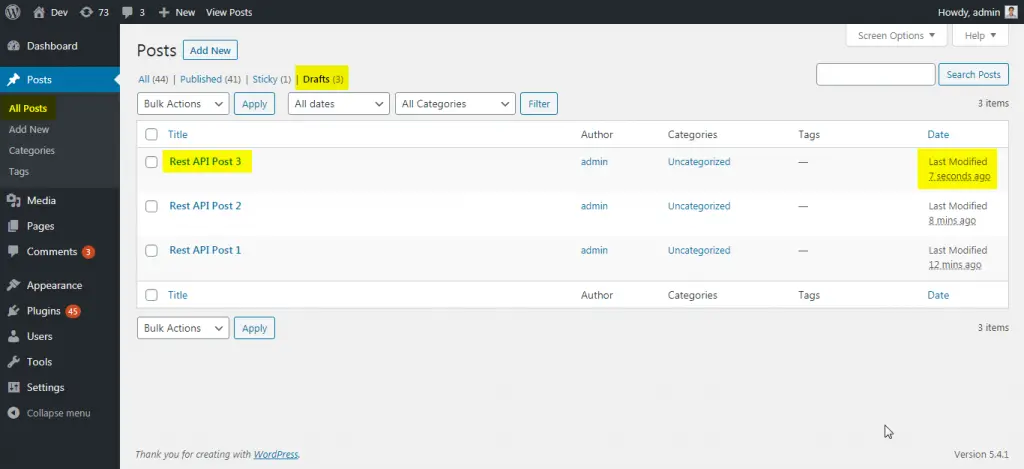Posts List Screen
[Top ↑](https://maheshwaghmare.com/doc/application-passwords/#top)
### [#Common Error & Solution](https://maheshwaghmare.com/doc/application-passwords/#common-error-solution) Common Error & Solution
If somehow your server have not added the HTTP Authentication support then you can see something below error:
Due to a potential server misconfiguration, it seems that HTTP Basic Authorization may not work for the REST API on this site: `Authorization` headers are not being sent to WordPress by the webserver. [You can learn more about this problem, and a possible solution, on our GitHub Wiki.](https://github.com/georgestephanis/application-passwords/wiki/Basic-Authorization-Header----Missing)
**Solution**
We need to add it from yourself into the .htaccess file. Add below code into your
```
RewriteRule .* - [E=REMOTE_USER:%{HTTP:Authorization}]Full Screen
```
After adding above code into .htaccess file we can use any application passwords.
> Performing Basic Authentication Rest API requests in WordPress with Application Passwords.[Tweet](http://twitter.com/share?\&text=Performing%20Basic%20Authentication%20Rest%20API%20requests%20in%20WordPress%20with%20Application%20Passwords.\&url=https://maheshwaghmare.com/doc/application-passwords/)
#### Like this: